

The client’s app now runs on its own platform, built to add new states without code changes and to serve drivers through a native mobile app with Google Maps place details. One architect delivered it in seven days, a 24-hour build followed by six days of hardening and field testing that ended with a security and performance pass, and a traditional agency would put the work at $475K-$975K.
Day One: Build the Stack
A React App Inside a WordPress Plugin
The app is a virtual version of the blue signs along the highway that advertise Food, Gas, Lodging, Attractions, and Camping, and it helps drivers find nearby advertisers using GPS and Google Maps.
The existing app lived inside a WordPress/Divi child theme as a custom plugin. React components bootstrapped via a [map] shortcode, API calls authenticated with WordPress nonces, config injected through wp_localize_script, and location data split across per-state database tables. Every change required navigating both WordPress internals and the custom React codebase.
The client needed the app to stand on its own: a clean architecture that could scale to new states without code changes, serve mobile users with native apps, and integrate Google Maps with rich place details.
Vibe-Coding: From Plugin to Standalone Platform with Mobile Apps in a Day
The 87 commits across 3 new repositories in a day produced a standalone Slim 4 PHP API with rate limiting and admin authentication, along with a Turborepo monorepo that shares types and business logic across web and mobile. They also produced a redesigned Vite React web app with tenant branding, a full-bleed map, and a road-trip-themed landing page, as well as a React Native mobile app with GPS-first navigation, dark mode, map clustering, and pull-to-refresh.
Every layer was rebuilt from the ground up while the original WordPress app continued serving users. MDPSync’s WordPress knowledge and AI-accelerated development carried the full architectural migration.
Everything That Shipped
Interactive Google Maps
Full Google Maps integration with colored category pins, info windows, zoom controls, and browser geolocation auto-detection
Radius-Based Search
Find locations within 5–150 miles using Haversine distance calculation with customizable range and category filtering
Multi-State Support
Virginia, Texas, and North Carolina with state-specific map centers. New states added via CSV import, no code changes
Google Places Integration
Automatic enrichment with ratings, photos, and business details, cached for 30 days to minimize API costs
Infinite Scroll Cards
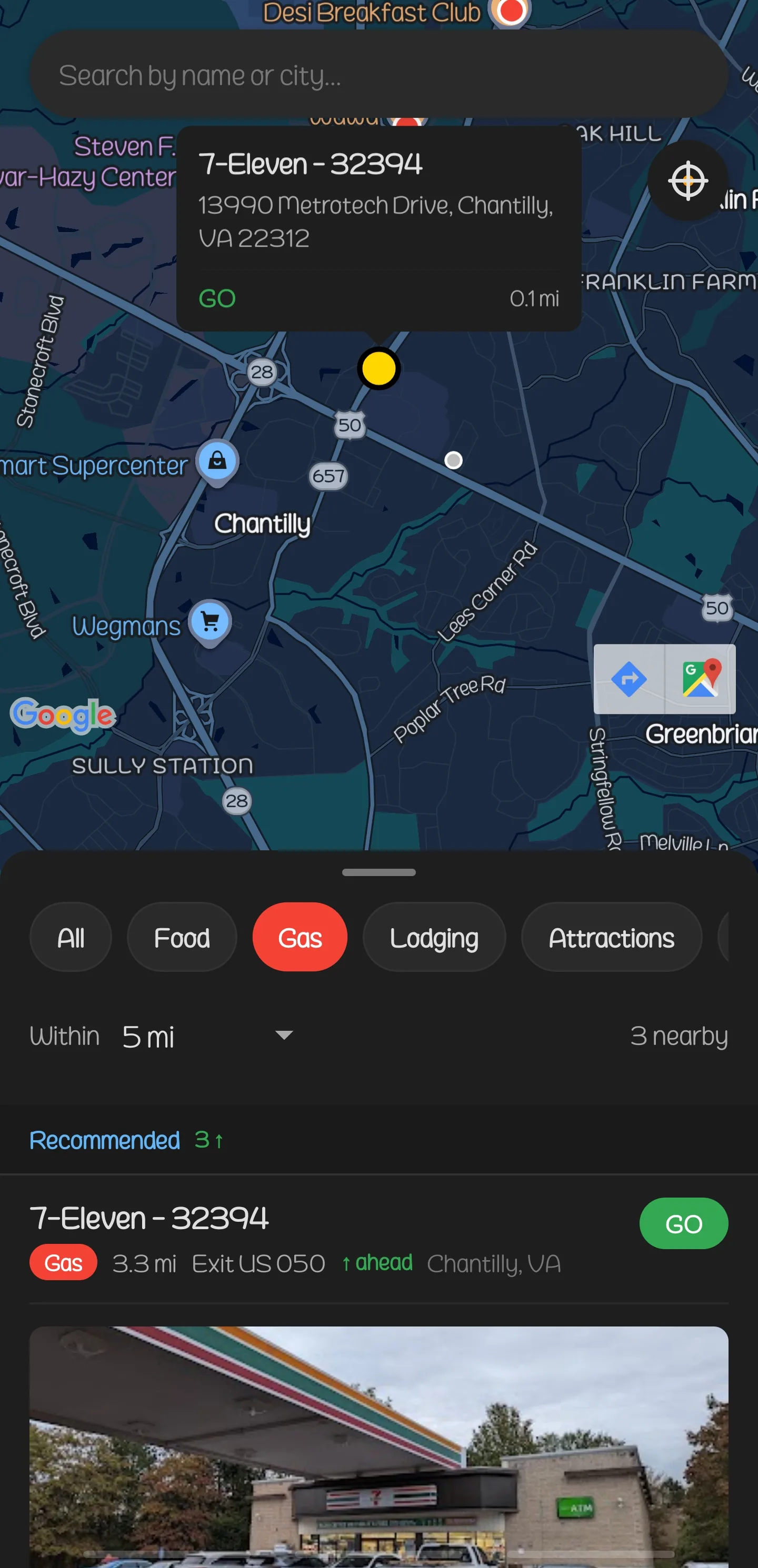
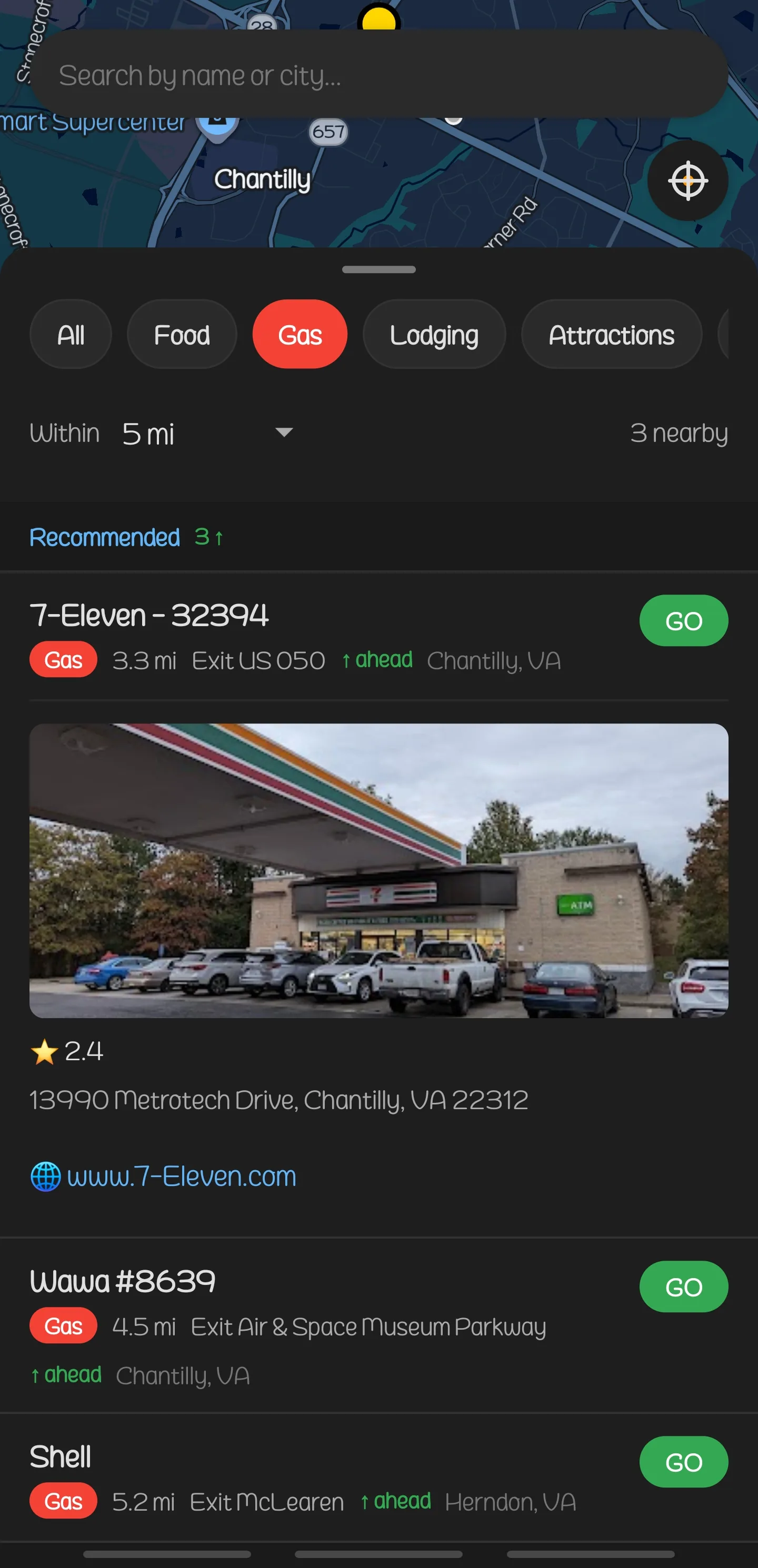
Location cards with expand-to-reveal details, synchronized with map pins. Click a pin to highlight a card, click a card to center the map
Standalone PHP API
Slim 4 framework with public and admin routes, rate limiting, session-based admin auth, and Haversine-powered location queries
Native Mobile App
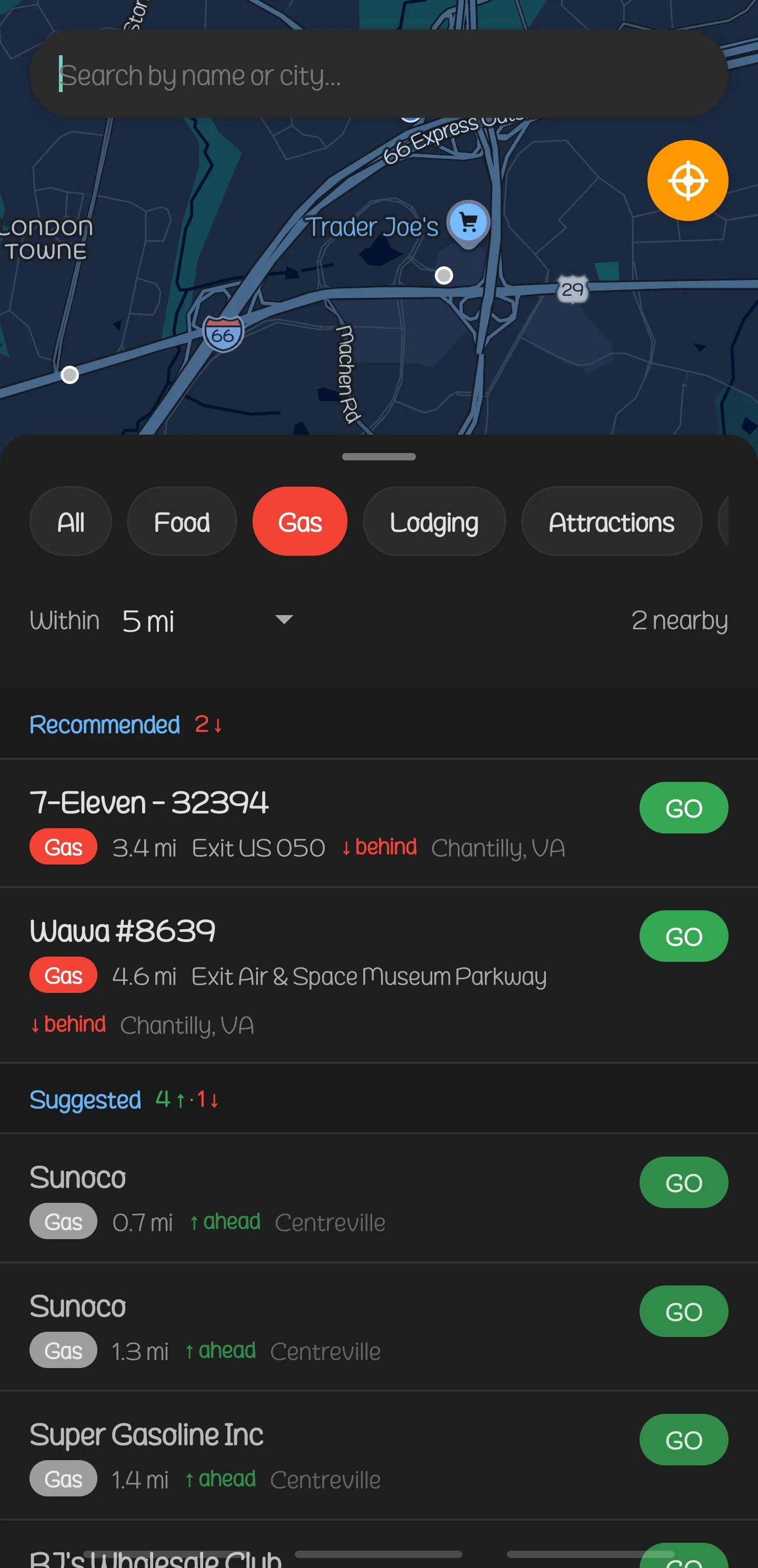
React Native + Expo with GPS-first navigation, dark mode, map pin clustering, bottom sheet UI, pull-to-refresh, and recently viewed tracking
Automated Data Pipeline
XLSX/CSV import with per-state column mapping, field validation, coordinate parsing, participation type normalization, and wipe-and-replace transactions
Intelligent Caching
JSON file cache with 30-day TTL for Google Place details, reducing API calls and costs while keeping data fresh
Admin Dashboard
HTML/CSS/JS admin panel with authentication, cache management, CSV import controls, and location data management
Redesigned Web App
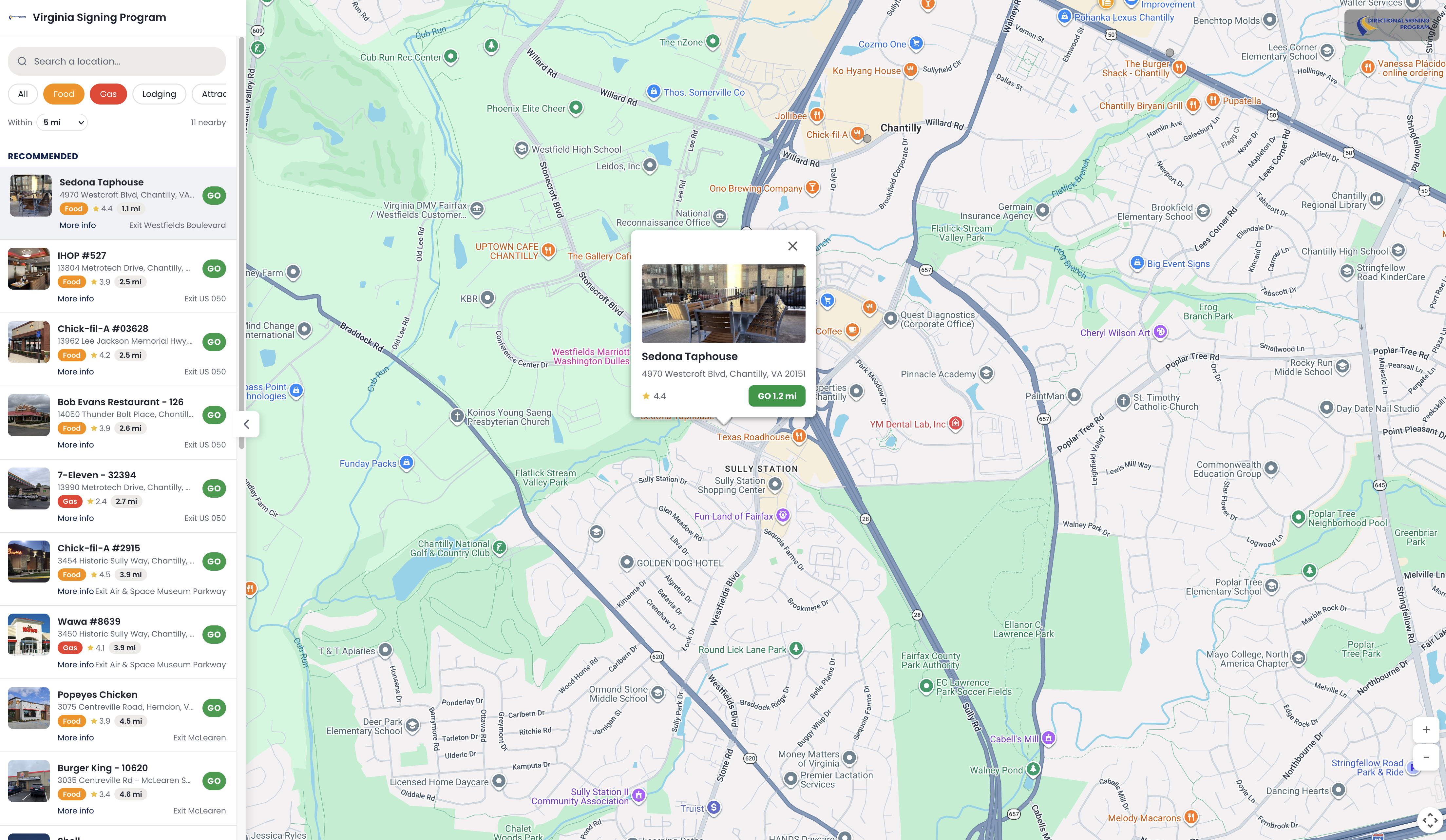
Full-bleed map with sidebar overlay, pill-style category filters, directions-first card design, and a road-trip-themed landing page
Multi-Tenant Branding
Per-state accent colors, logos, and document titles, configurable via TenantConfig without code changes
See It in Action
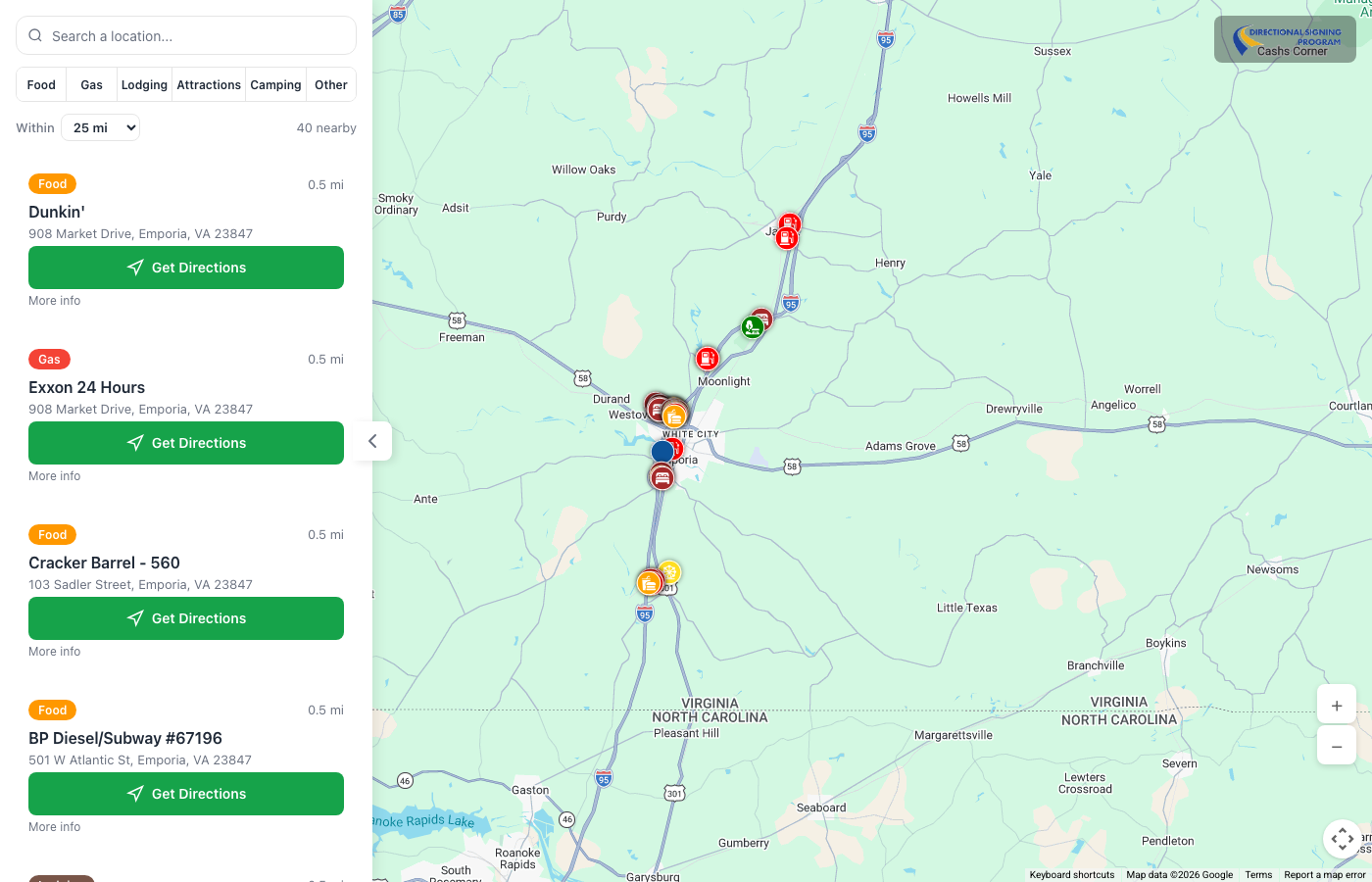
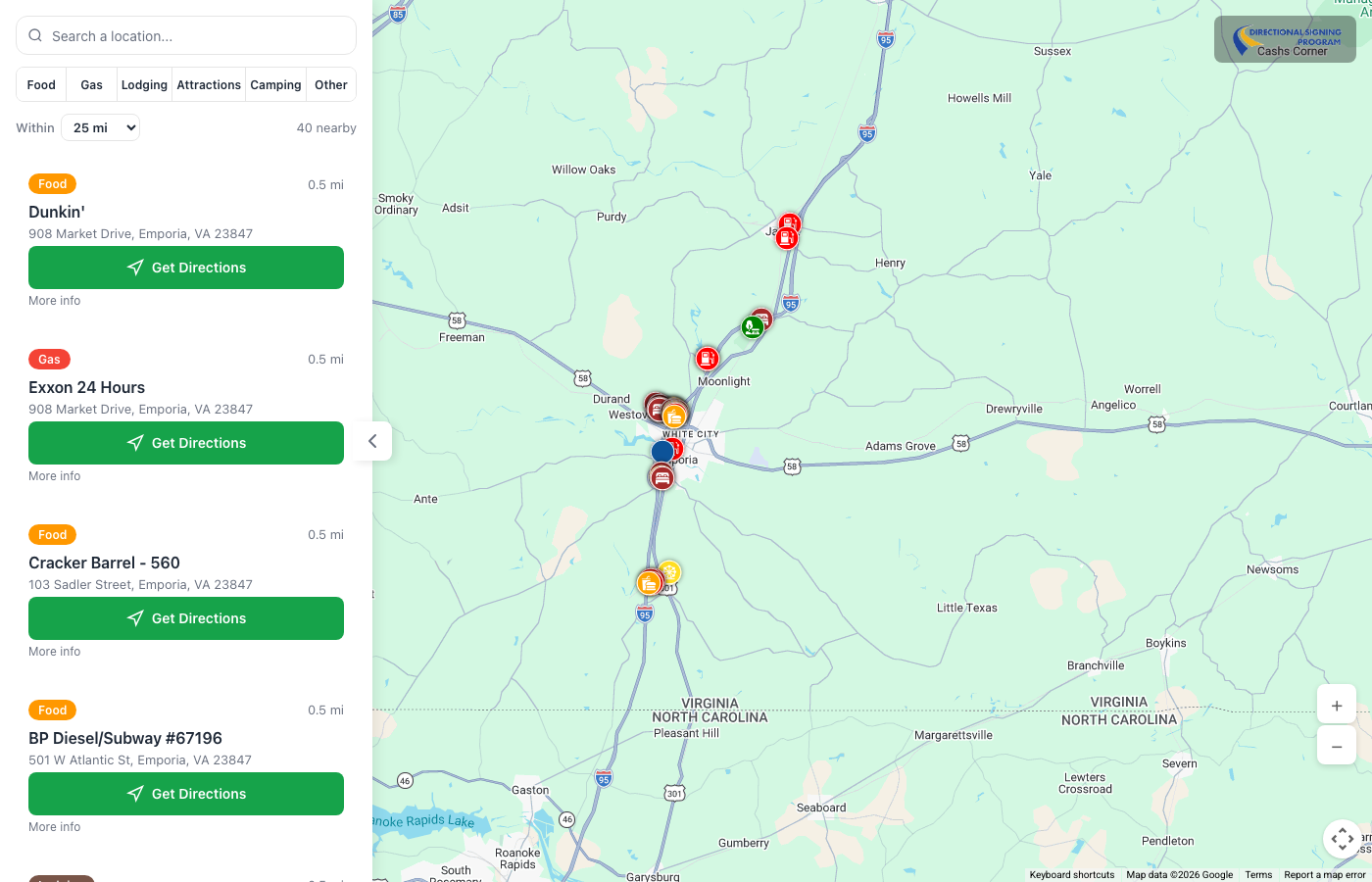
The Map Experience
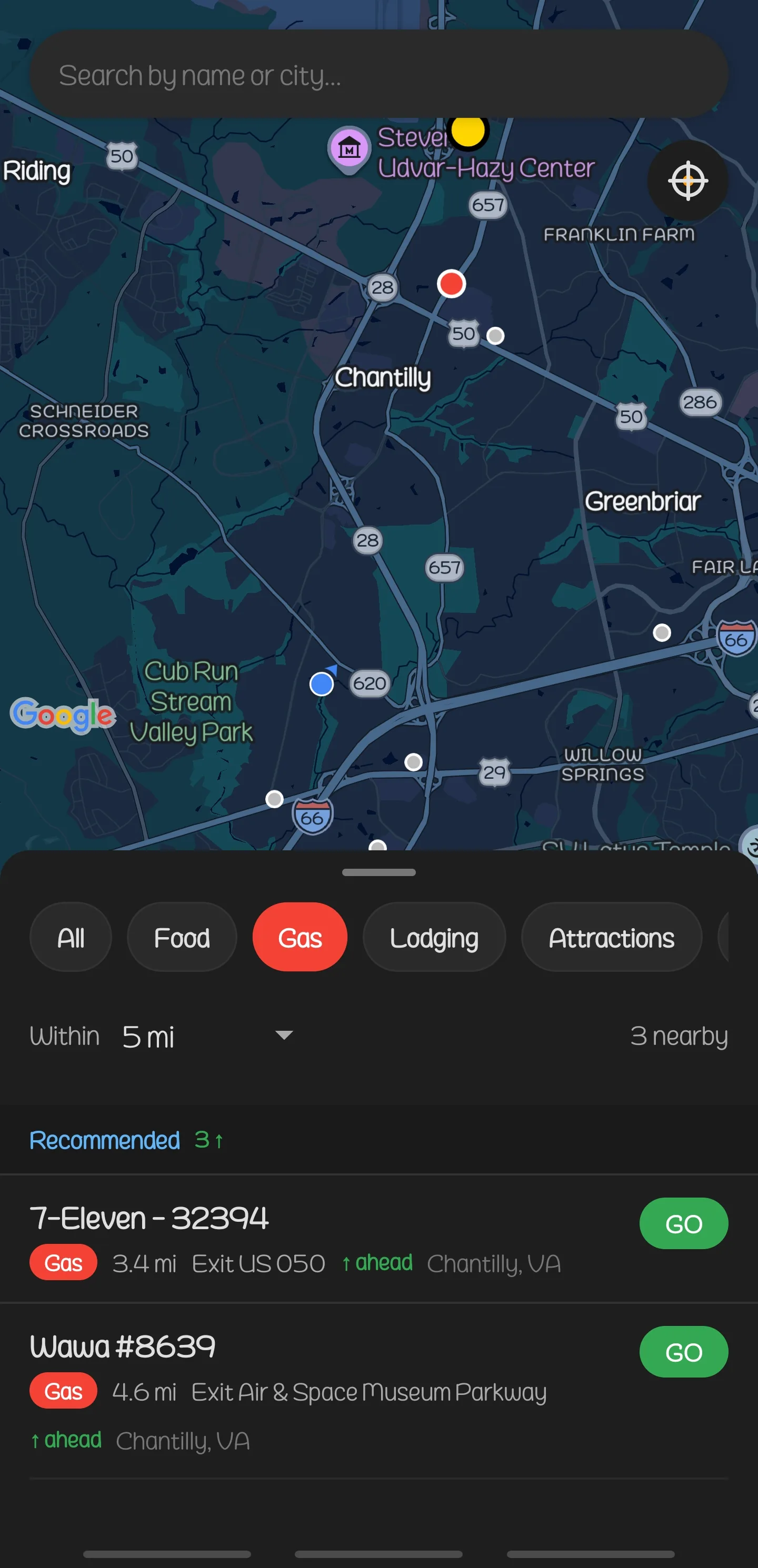
Full-bleed interactive Google Maps with six color-coded category pins: Food, Gas, Lodging, Attractions, Camping, Other. Info windows with business name, address, and “Get Directions” deep links. Browser geolocation auto-centers the map on the driver’s location. Sidebar overlay on desktop, bottom sheet on mobile.
Smart Location Cards
Directions-first card design with quick action buttons for calling and navigation. Expand any card to reveal Google Place photo, star rating, phone, address, and website. Cards sync bidirectionally with map pins, and clicking either highlights the other. Infinite scroll with React Query managing server state and pagination.
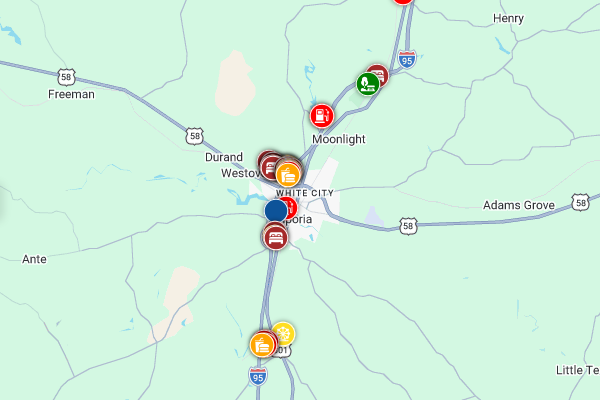
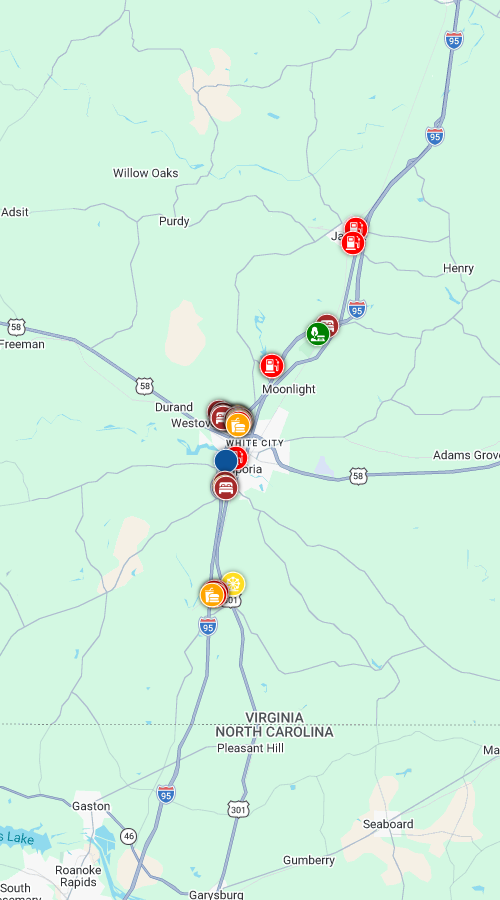
Multi-State & Category Filtering
Six highway sign categories with color-coded pill toggles matching the physical signs. State detection via GPS on mobile, route-based on web. Range slider from 5 to 150 miles using Haversine distance. All filters trigger real-time API queries. The mobile app adds search-by-name and recently viewed sections.
From CSV to Map Pin
The full data pipeline: XLSX and CSV files imported through CLI tooling with per-state column mapping and field normalization. Wipe-and-replace transactions keep data consistent. Haversine-powered API queries serve locations by radius. Google Places enrichment adds ratings and photos. File-based caching with 30-day TTL keeps API costs low.
From WordPress Plugin to Standalone Platform
The WordPress plugin became three purpose-built repositories in a day.
Repository Overview
| Repository | Commits | Purpose |
|---|---|---|
| highwaysigns-api | 29 | Standalone Slim 4 PHP API with admin panel |
| highwaysigns-apps | 36 | Turborepo monorepo: Vite React web app + shared package |
| highwaysigns-mobile | 22 | React Native/Expo mobile app |
Before & After
| Component | WordPress (Before) | Standalone (After) |
|---|---|---|
| Frontend | React in Divi child theme shortcode | Vite React SPA with redesigned UI |
| API | WordPress REST API + WP nonces | Slim 4 PHP with rate limiting and admin auth |
| Database | Per-state tables (wp_locations_va, _tx, _nc) | Unified locations table with state column |
| Config | wp_localize_script injection | /api/v1/config endpoint |
| Cache | WordPress uploads directory | Dedicated cache directory outside web root |
| Auth | WordPress nonces (X-WP-Nonce) | PHP sessions (admin), public endpoints open |
| Build | Webpack 5 + Babel | Vite with HMR, Turborepo for monorepo |
| Import | WP-CLI with CSV only | CLI with XLSX + CSV, per-state column mapping |
| Mobile | None | React Native + Expo with GPS-first UX |
| Branding | None | Multi-tenant with per-state accent colors and logos |
Highway Sign Categories
Technology Stack
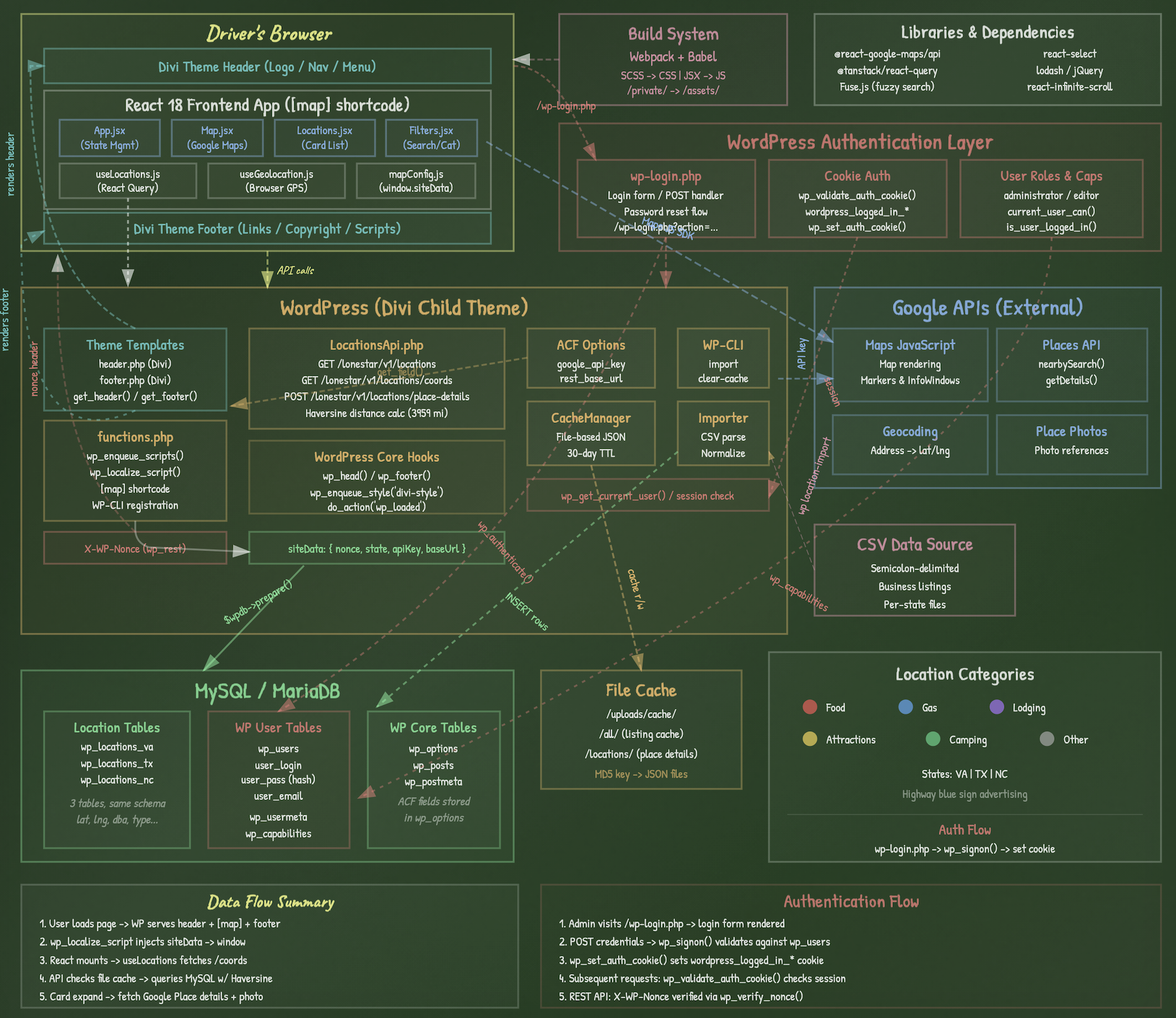 Before: WordPress plugin architecture
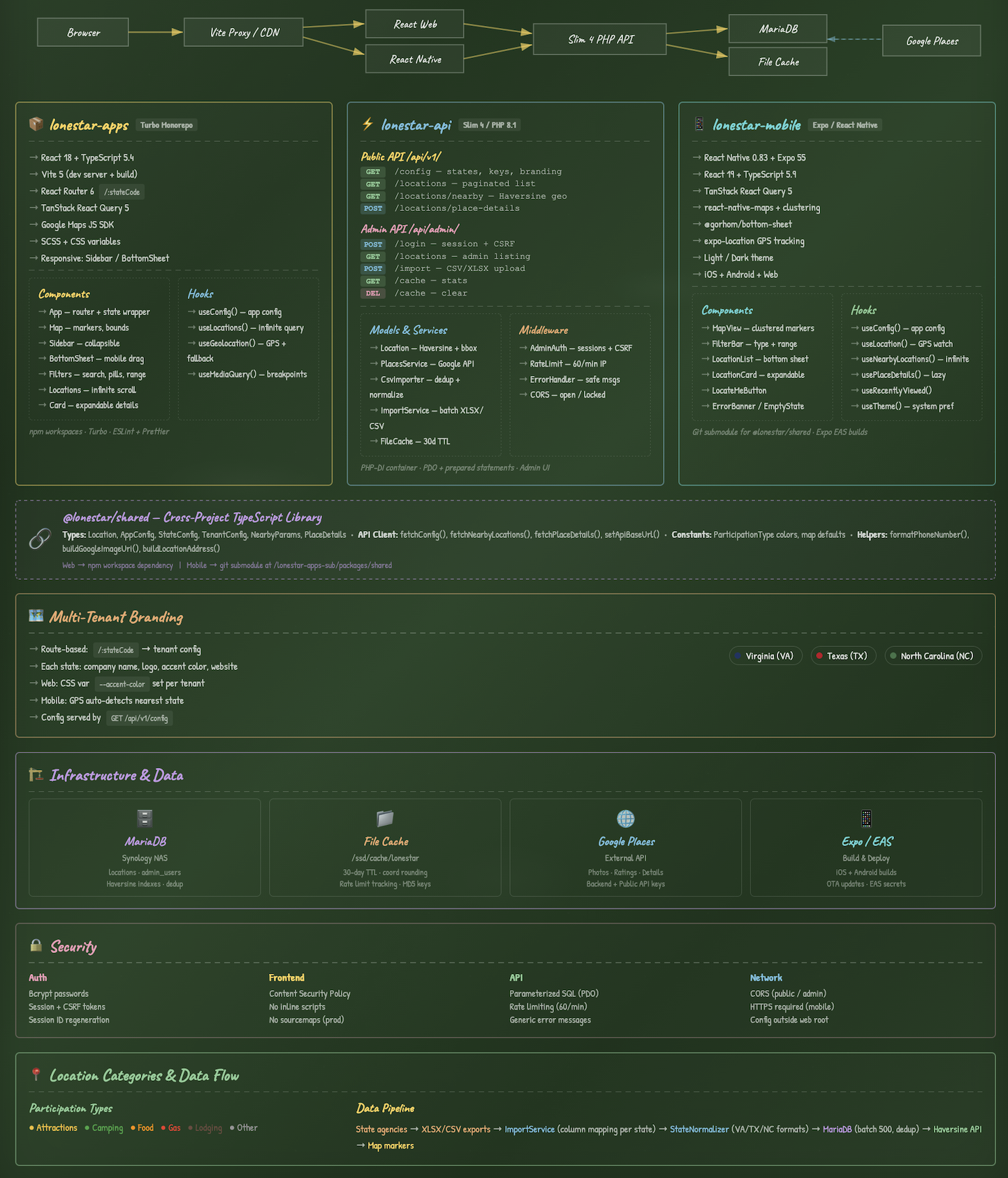 After: standalone platform architecture
✕ WordPress Limitations
- ✕WordPress core, themes, and plugins require constant security patching
- ✕Full CMS overhead for an app that never uses posts or pages
- ✕Nonce-based REST authentication tied to WordPress sessions
- ✕No path to native mobile apps without a separate API
- ✕Per-state database tables require code changes to expand
- ✕Config injected via wp_localize_script, tightly coupled to theme
- ✕Divi theme dependency limits frontend flexibility
- ✕No multi-tenant branding, single site, single look
- ✕Webpack build process buried inside plugin directory
- ✕No shared type safety between frontend and backend
✓ Standalone Improvements
- ✓Zero WordPress attack surface, no CMS to exploit
- ✓Slim 4 API handles only what the app needs, nothing more
- ✓Session + CSRF auth with rate limiting at 60 req/min
- ✓React Native mobile app with GPS, dark mode, and map clustering
- ✓Add new states by importing a spreadsheet, zero code changes
- ✓Config served via API, decoupled from any theme or CMS
- ✓Vite + React with full-bleed map, road-trip landing page
- ✓Route-based multi-tenant branding per state with accent colors
- ✓Turborepo monorepo with shared TypeScript library across apps
- ✓End-to-end type safety from API responses to UI components
New Architecture
Web Frontend
API & Backend
Mobile & Infrastructure
Infrastructure & Performance
Apache2 web server with MariaDB database hosting. File-based JSON caching reduces Google Places API costs by storing place details, ratings, and photos for 30 days. Haversine distance calculation with bounding-box optimization keeps radius queries fast across thousands of locations. Rate limiting at 60 requests per minute protects the API. A new state is added by importing a spreadsheet, with no code changes required.
The Vibe-Coding Advantage
A complete platform migration (standalone API server, redesigned web app, native mobile app, admin panel, shared type package, multi-tenant branding, and automated data import), all delivered in a day by a single architect with AI.
Built in 24 Hours
The full migration from WordPress plugin to standalone platform finished in a single day, with the API, web app, mobile app, and admin panel all built.
Enterprise Architecture
A Slim 4 API with rate limiting and session auth, a Turborepo monorepo with shared TypeScript types, file-based caching, and bounding-box query optimization, each pattern chosen by an experienced engineer.
Web, Mobile & API
One architect produced a PHP API server, a redesigned React web app, a React Native mobile app, and an admin panel, with the web and mobile apps sharing types and business logic through a monorepo package.
What This Would Cost the Traditional Way
Building this platform through a traditional agency would require assembling a cross-functional team: a backend engineer, a frontend developer, a React Native mobile developer, a DevOps engineer, a UI/UX designer, and a project manager to coordinate it all.
At 2026 agency billing rates, that’s 6 specialists over 3–5 months. The total cost would range from $250,000 to $500,000, before accounting for coordination overhead and the handoff delays and rework that come with multi-team projects.
One architect working with AI delivered all of it in a single day, at a fraction of the cost.
Day Two: Harden & Release
Hardening the Stack
Day One ended with a working platform: a backend server, a redesigned web app, and a native mobile app.
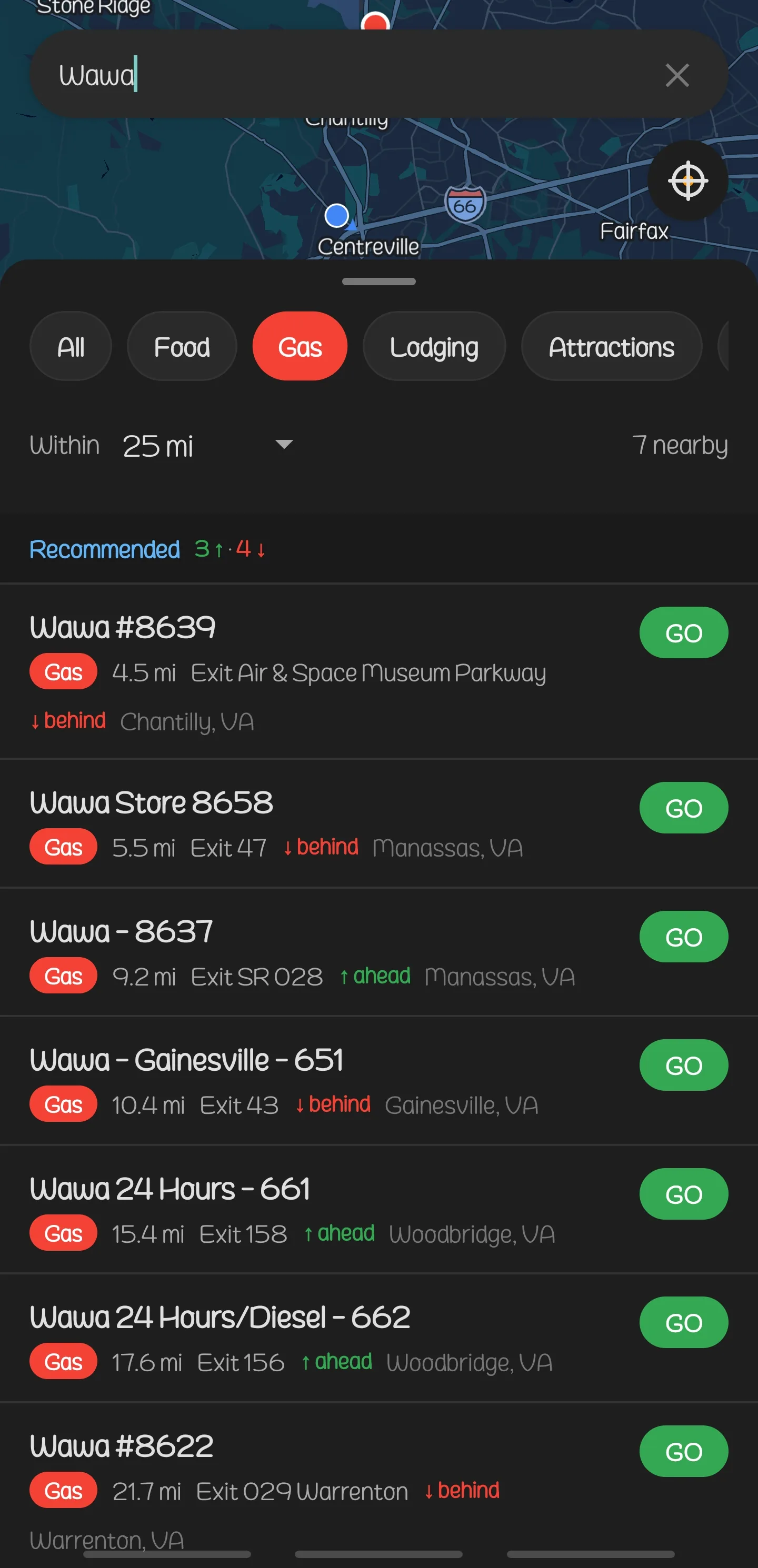
On Day Two the platform went through a full security review, and the web and mobile apps gained the same capabilities, closing the gap between “it works” and “it’s ready for real users.” It also added the forward-looking feature described below, where the app detects the direction you’re driving and shows only what’s ahead.
By the end of the second day, one architect had submitted both the iPhone and Android apps for testing.
Forward-Looking Navigation
Most map apps show every location in every direction. That’s fine when you’re standing still, but when you’re driving down the highway, half those results are already behind you. The forward-looking feature uses your phone’s GPS to figure out which way you’re headed, then filters out anything you’ve already passed. You see the next gas station, the restaurant at the next exit, the campground 20 miles ahead, not the one you drove by five minutes ago.
The app detects when you’re driving and switches to forward-looking mode on its own, with no toggle, and the full 360° view comes back when you pull over or stop. The feature went from design to a tested build in a single day.
Security and Stability on Day Two
Day Two put the server, web app, and mobile app through a complete security review, locked down sensitive data, blocked abuse, and made the app recover from unexpected errors instead of failing.
Sensitive Keys Hidden
Private API keys that power Google Maps and business photos were moved behind the server, invisible to anyone inspecting the app
Login Protection
Admin login locked down with industry-standard cookie security and brute-force protection. Too many wrong passwords and the door shuts automatically
Abuse Prevention
Every request to the server is checked for sanity: search radius capped, page sizes limited, and only valid states accepted. Bad requests get rejected before they cost anything
Browser-Level Protection
Modern security policies added so browsers enforce encrypted connections, prevent the app from being embedded on malicious sites, and block common web attacks
Mobile Safety
External links verified before opening, sensitive credentials removed from app config, and GPS automatically re-detects your state when you cross a border
Faster & Smoother
Map scrolling optimized so pins don’t lag, GPS updates throttled to save battery, drag interactions fixed for smoother swiping, and network requests now time out instead of hanging
Closing the Gaps
The web app gained error recovery in place of blank screens, URL handling that catches typos and redirects to the right page, and the same security protections as the mobile app. Swipe and drag interactions were smoothed out so the bottom sheet feels native.
On the server side, a database precision issue that would have misplaced locations in West Texas was fixed, and the admin panel got a smoother login with session memory.
| Fix | Before | After |
|---|---|---|
| Business photos | API key visible to users | Key hidden behind the server |
| Bad URLs | Broken “page not found” errors | Auto-corrected and redirected |
| App errors | Blank white screen | Friendly error with recovery option |
| West Texas locations | Pins placed in wrong spot | Full coordinate precision |
| Admin login | Unlimited password guesses | Locked after too many attempts |
99 Commits Across 3 Repos, Ready for Testing
| Repository | Day One | Day Two | Total |
|---|---|---|---|
| highwaysigns-api | 29 | +1 | 30 |
| highwaysigns-apps | 36 | +3 | 39 |
| highwaysigns-mobile | 22 | +8 | 30 |
| Total | 87 | +12 | 99 |
What Day Two Would Cost the Traditional Way
Day Two’s work (a full security review, a new GPS-powered driving feature, performance tuning, and submitting apps to both the App Store and Google Play) would traditionally require its own team: a security specialist to review the whole stack, a mobile developer to ship to both stores, an engineer to design the directional navigation, and a QA lead to test everything across three platforms.
At market rates, that’s 4 specialists over 2–4 weeks. The total cost would range from $40,000 to $80,000, and that assumes a clean handoff from the team that built it on Day One. In reality, onboarding new people to a fresh codebase adds weeks of ramp-up before the real work starts.
The same architect who built it on Day One secured it and released it to testers on Day Two, with no handoff in between.
Day 3–6: Testing in the Truck
The App on the Road
Test builds had reached testers by the end of Day Two, and Days Three through Six put the app on the road for three rounds of field testing. Each round uncovered things that only show up when the app is used as designed, behind the wheel and scanning for signs at highway speed.
Field-Tested, Three Times Over
The first round caught a crash that only happened under specific driving conditions. The second round found layout issues on different screen sizes and interactions that didn’t feel right at speed. The third round polished the details, with smoother transitions and better touch targets.
Between rounds, a full code review across all three repos caught type errors, missing validations, and performance bottlenecks. Components were optimized so the app stays responsive even with hundreds of locations loaded. Startup time was cut down.
Crash Fixes
Edge cases caught in the field, not in a simulator.
Faster Startup
Optimized so the app is ready before the driver is.
Touch & Feel
Haptic feedback, smoother filters, and better touch targets.
Code Review
Line-by-line audit across all three repos.
Every Feature, Everywhere
Six features that started as mobile-only were ported to the web app, so the phone and desktop experiences now match. Directional filtering was refined for edge cases like U-turns and slow-speed driving. Areas with sparse sign coverage now show richer results thanks to server-side data enrichment that fills in gaps automatically.
On the API side, caching was tuned so repeated searches in the same area are instant, and the server sends the right headers so the web app loads faster on return visits.
Features Ported to Web
- ✓ Directional filtering for driving
- ✓ Server-side location backfill
- ✓ Two-tier location display
- ✓ Recently viewed locations
- ✓ Distance-sorted results
- ✓ Empty state for directional filter
Dark Mode & Custom Branding
The mobile app got full dark mode support, a safety feature for night driving. When you’re driving at night, a bright white screen is a distraction. Dark mode keeps the interface visible without competing with the road.
The default Expo app icons were replaced with custom Highway Signs branding: a proper app icon, splash screen, and in-app identity.
Day 3–6: Polished & Tested
Three rounds of field testing, dark mode, custom branding, and dozens of refinements.
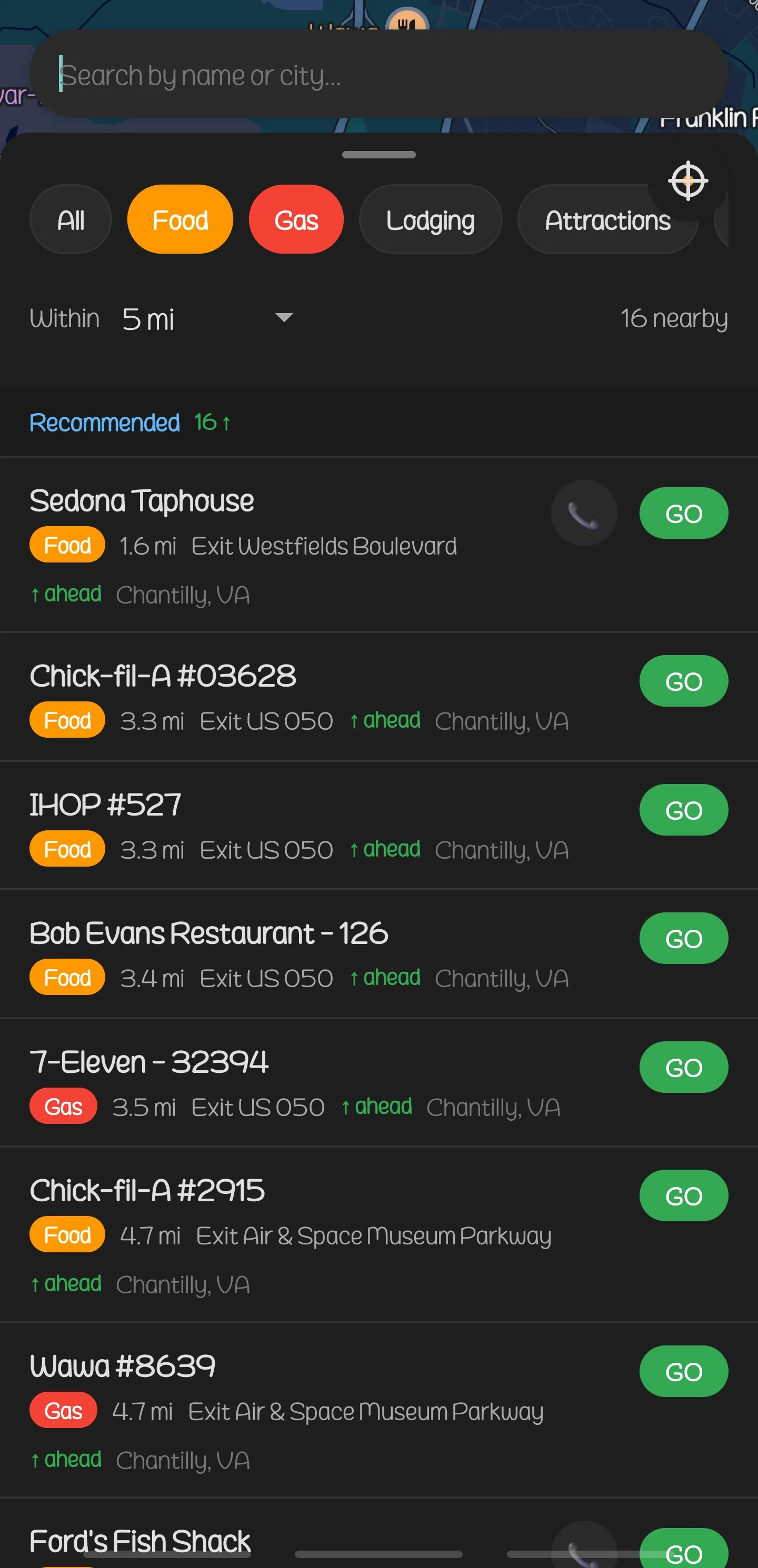 List
List
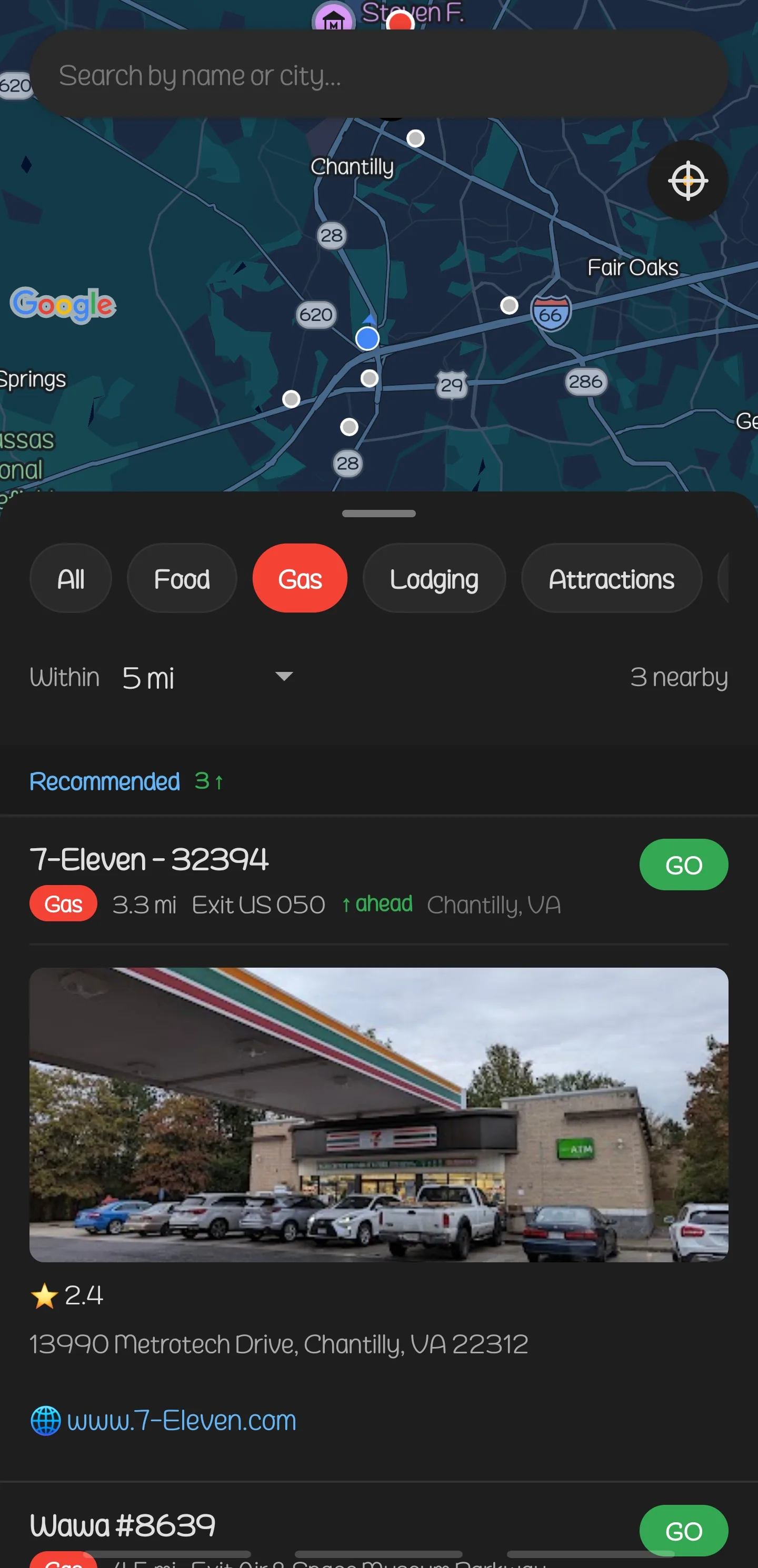 Browse
 Filter
 Home
Home
 Pick
Pick
 Browse
 Search
The Redesigned Web App
Click to enlarge.
What This Testing Phase Would Cost the Traditional Way
Three rounds of field testing, a full code review, porting features across platforms, performance optimization, dark mode, and custom branding would traditionally need a QA lead running test cycles, a mobile developer iterating on builds, and a frontend developer porting features to the web, coordinated over 1–2 weeks.
Three specialists over 1–2 weeks would cost $20,000 to $40,000 at market rates if the same team from Day One were still available. In practice, QA and polish phases often get deprioritized or handed to a different team entirely.
Day 7: Security & Optimization
Security and Performance Hardening
The app had already been polished through field testing and released to testers.
Day Seven was a full security audit and performance pass across every layer of the platform: the API, the web application, and the mobile app. The audit reviewed each endpoint and validated each input, and the performance pass eliminated unnecessary re-renders.
Hardened Across Every Layer
Each of the three repos got a full code review in a single day, and the API, the web app, and the mobile app were each audited for vulnerabilities and hardened against attacks, reaching production-grade security standards.
Request Protection
API locked down against server-side request forgery, preventing attackers from tricking the server into making unauthorized calls
Input Sanitization
Every user input validated and cleaned before it touches the database, blocking injection attacks at the front door
Content Security Policy
Browser-level rules that prevent unauthorized scripts from running, configured to work with Cloudflare’s proxy layer without breaking it
Geolocation Reliability
Location services hardened with proper error handling and fallbacks. The app works even when GPS signals are weak or unavailable
Concurrency Protection
Race conditions eliminated so simultaneous requests don’t corrupt data or crash the server under load
Accessibility
Screen reader support, keyboard navigation, and semantic markup brought up to standards across the web application
Faster Where It Matters
Eight performance fixes landed in the mobile app without changing what it does: calculations that ran on every frame now run once and are cached, and components that redrew unnecessarily now redraw only when needed. Startup is faster and map panning is smoother, and the data layer was tuned to pull less and cache smarter.
The callout cards that appear when you tap a location no longer interfere with touch, and distance calculations stay consistent between the drawer and the map.
What This Security Sprint Would Cost the Traditional Way
A full security audit across three platforms, performance profiling and optimization, and an accessibility review would traditionally take a security auditor running penetration tests and reviewing code, a performance engineer profiling and optimizing, and an accessibility specialist auditing compliance, coordinated across 1–2 weeks.
At market rates, 3 specialists over 1–2 weeks come to $15,000 to $30,000, assuming the security auditor has enough context on the codebase to know what to look for. In practice, external auditors spend the first week understanding the architecture.
137 Commits Across 3 Repos
| Repository | Day One | Day Two | Day 3–6 | Day 7 | Total |
|---|---|---|---|---|---|
| highwaysigns-api | 29 | +1 | +2 | +2 | 34 |
| highwaysigns-apps | 36 | +3 | +6 | +4 | 49 |
| highwaysigns-mobile | 22 | +8 | +11 | +13 | 54 |
| Total | 87 | +12 | +19 | +19 | 137 |
What This Project Would Have Cost the Traditional Way
Priced as one project instead of four phases, the work covers a REST API, web application, native mobile apps for iOS and Android, Google Maps integration, GPS-powered navigation, security hardening across all three repositories, a dedicated security audit and performance optimization pass, three rounds of field testing, dark mode, custom branding, and app store submissions, which makes it a full product build.
The traditional approach would require a team of 7–10 specialists: backend, frontend, mobile, DevOps, security, geospatial, QA, design, and a project manager to keep everyone on track. At 2026 agency billing rates over 4–8 months, the total cost would range from $475,000 to $975,000. That figure also leaves out the rework that handoff gaps and context loss between teams would add, along with the cost of coordinating a team of that size for up to eight months. Because one engagement calls for a larger team over a longer schedule than the four phases priced separately, the total exceeds the $325,000 to $650,000 that the four phases add up to.
One architect carried the platform from first build to final optimization in seven days, with no handoffs and no lost context along the way.
Tell Us What You Want Built
A WordPress plugin became a standalone platform with native apps in a day, and we can tell you what it would take to build what you need.