How I Replaced a $500-a-Year QuickBooks Subscription With
a Single Plan
Let me start off with, I am not an accountant. But I have a
single-member LLC, I file a Schedule C, and for years I paid $38 a
month for QuickBooks to do the bookkeeping while outsourcing the
maintenance. Eventually, I decided it was time to replace it, and in
one day I did so with a native Mac app I built from a Plan using
Claude/Codex and ChatGPT. The plan is the part I am sharing, and I
will give it to you.
I run a side business as a single-member LLC, the kind of
operation that earns a little, spends steadily, and at the end
of the year collapses into a Schedule C attached to my
personal return. QuickBooks is built for something much
larger, a company that needs a general ledger, and it came
with a chart of accounts I had not designed and a vocabulary I
had to look up every time I opened it. For that I was paying
$38 a month, about $456 a year, to run software I could never
quite drive on my own.
I needed the app to pull the transactions from my bank and
card accounts, sort each one into a category that maps to a
Schedule C line, let me fix the few the machine gets wrong and
remember those corrections so it never asks again, show me
where the money went across the year, and produce a clean
export my accountant could open in January. Invoicing sat on
top of that, because I bill customers and have to send them
something. None of it requires a double-entry accounting
package, and yet every part of it was buried under features I
would never touch.
From a Prompt to a Plan
I started with the brief instead of code, and I did not write
it alone: I asked ChatGPT to play a senior accounting
consultant and draft a starting plan for someone in exactly my
position, a non-accountant running a single-person LLC who
files a Schedule C and wanted something simpler than
QuickBooks but no less correct. The prompt I gave it was short
and plain.
The Seed Prompt
I am not an accountant. I have a side business that is a single-person LLC, and I file a Schedule C. I use QuickBooks, but I need something I can understand. As a senior accounting consultant, write a plan I can use as a starting point to build a simple, understandable accounting application. It should take in data from an MCP connected to my accounts, categorize transactions, and give me dashboards and reporting. Assume it needs to be an effective replacement for QuickBooks.
That produced a first plan, which I took to Claude and had
built into the real thing, a full implementation plan with an
architecture, a data model, a domain layer, and an ordered
milestone sequence. Then the whole document went back through
review, because the first draft of anything is the one most
likely to be hiding a wrong assumption. Codex read it as a
critic and found the gaps, I handed that critique to Claude's
UltraPlan for a final pass, and we went back and forth for a
couple of hours until the plan was tight enough to run in one
shot instead of in a dozen corrective rounds.
I ran the plan, and by the end of the day I had an app good
enough to cancel the subscription, because a plan that has
been through two independent reviews takes a few hours to
build and does not need correcting halfway through. The couple
of days after that were customization and one piece of setup:
wiring up the data feed that pulls my accounts.
What I Built
The result is a native macOS app that keeps everything
financial in a single SQLite file on my Mac, and that file,
not a server and not a cloud account, is the only source of
truth. The app never talks to my bank, never moves money, and
holds no API keys of any kind, because it is read-only toward
every institution by design and has no code path to be
anything else.
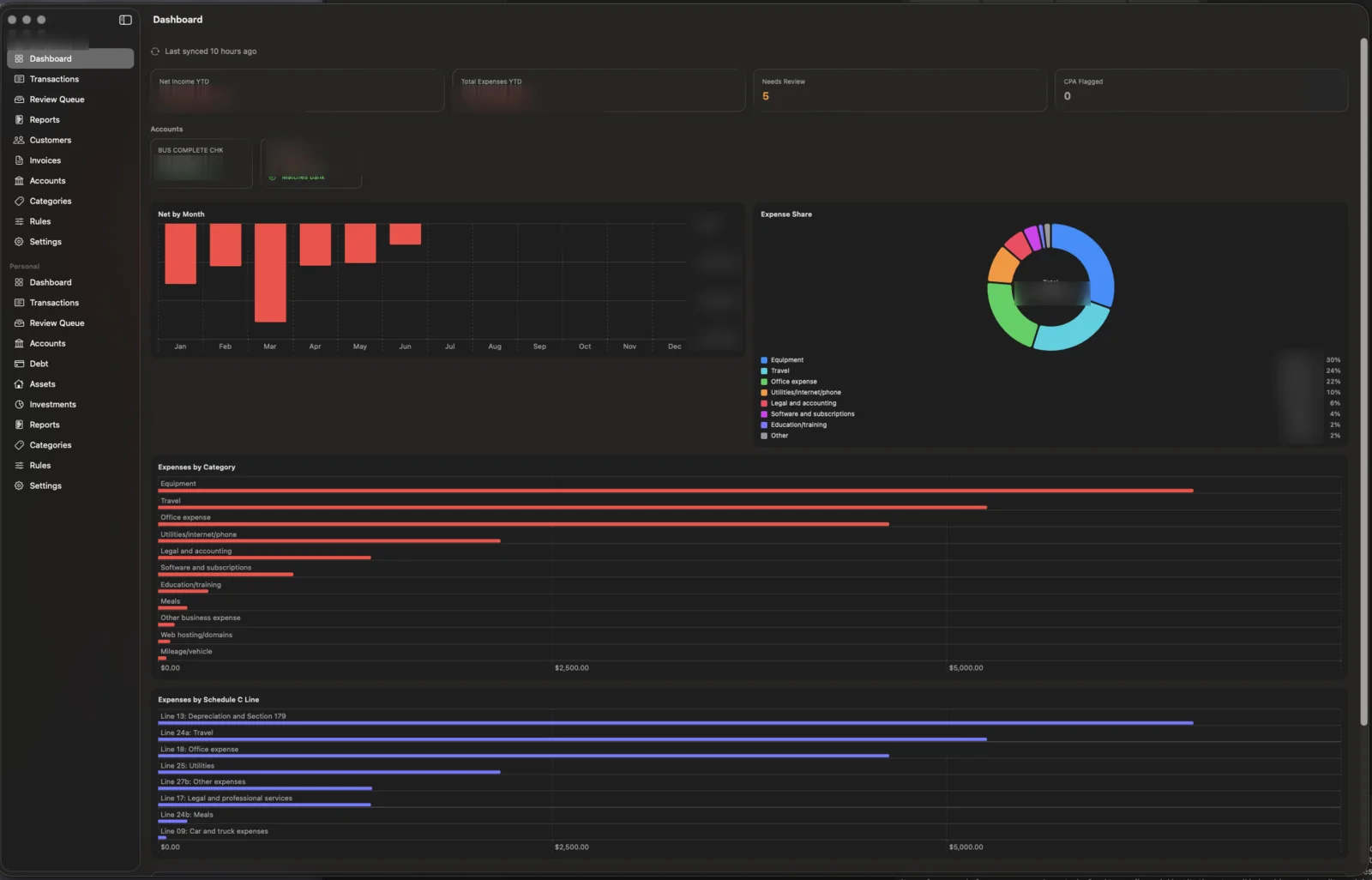
The business dashboard: year-to-date net, account
reconciliation, spend by category, and a Schedule C line
breakdown. Dollar figures and the company name are blurred.
Figure 1: mdpBooks System Architecture
The sync bridge
The only code that touches the network lives outside the app.
A small Node job runs on a schedule, uses an MCP connected to
my institutions (built on OpenBudget) to pull the last few
weeks of activity, and writes a plain JSON file in a fixed
shape. The app only ever reads that file. A cheap, fast model
suggests a category for each new transaction, and the rule
engine handles the repeats so the model rarely runs. The only
secret in the whole system is that model's key, and it never
enters the app.
Categorize, then review
Deterministic rules run first, the model fills in new
merchants, and everything uncertain lands in a
one-card-at-a-time review queue. When I correct a category,
the app mints a rule from that decision, so the same merchant
is never asked about twice. Transfers and credit-card payments
are detected and held out of the reports, which is the defense
against double-counting: a card purchase is an expense once,
when it is charged, and the later payment is a transfer on
both legs and counts as neither.
The model step uses your Anthropic API key. When a new
business appears for the first time, the sync job sends its
name to Claude, which returns the right Schedule C bucket, so
a restaurant becomes Meals, a hotel becomes Travel &
Lodging, and a software subscription becomes Office Expense.
That call happens once per merchant. After that, the saved
rule handles every future charge from the same place
automatically.
Schedule C, dashboards, and the January export
Every income and expense category maps to a real Schedule C
line, zero-padded so the summary sorts in the order the form
uses rather than the order a plain string sort would impose.
The dashboard shows year-to-date net, the months as a trend
line, where the money went as a category donut, and a Schedule
C readiness view, and every report exports to CSV, with the
full transaction export standing in as the file my accountant
gets in January. Nothing in it needs a reconciliation ritual
or a closing of the books, and the numbers are arranged in the
shape the tax form uses.
Invoicing, kept separate
The app also bills customers and renders a formatted PDF, but
invoicing never posts to the ledger. On cash basis the income
is recognized when the deposit lands and arrives through the
normal sync, so an invoice that also booked income would
double-count against that deposit. Invoices stay billing
documents with their own status, and an automated test proves
that creating, sending, and paying one never moves a single
number in the books.
The Math
QuickBooks was $38 a month, which comes to about $456 a year,
and the replacement costs nothing to run except the one piece
I cannot build myself, a paid MCP that connects to my
financial institutions for $60 a year. The build was a single
day of my time against a plan I already trusted, and
everything that came out of it, the categories and the rules
and the reports, is mine to change whenever I want.
Was paying
$456/yr
QuickBooks, $38/mo
Now paying
$60/yr
Account data feed (MCP)
Build time
1 day
Against a reviewed plan
The Plan, in Full
The document below grew out of the seed prompt above and is
the plan that would let a model rebuild this app from an empty
folder. It carries the architecture, the data model and its
migration chain, every domain engine and the rules they got
wrong the first time, the sync bridge, the milestone order,
and the decisions I would defend. It uses placeholders
everywhere a real deployment used private values, so there are
no account numbers, no keys, and no bank data in it. Copy it,
hand it to Claude or Codex or Cursor, and adapt it to your own
situation.
The Plan has been sanitized, so you may have some lift in
making it personal by needing to add your own API Keys,
install your own MCP and configure your data source (I used
OpenBudget and Truthifi because no one tool connected with all
my institutions).
Then Personal, Too
I was also paying for Quicken Simplifi, $68 a year, to watch
my personal accounts, and the app I had just built already
pulled accounts, categorized transactions, and charted where
the money went. The only thing it did not do was keep personal
and business apart.
So I added a second silo. The business books and the personal
books now live in the same app and on the same machine but
never touch, each carrying its own accounts, categories,
dashboards, and review queue, so that business spending maps
to Schedule C lines while personal spending stays ordinary
household money that answers to no tax form. I open one app
instead of two, and the second subscription is gone.
QuickBooks and Simplifi together were $456 and $68, which is
$524 a year, for two tools I rented and did not control. The
replacement costs $60 a year for the data feed, the one thing
I cannot build myself, while everything else came from a plan
and an afternoon.
Two subscriptions
$524/yr
QuickBooks + Quicken Simplifi
One app
$60/yr
Business and personal, siloed
Kept every year
$464/yr
And software I own
Mobile App Companion
The Mac app handles everything, but I wanted a quick read on
the go. A simple side-loaded companion app was straightforward
to add, a lightweight dashboard pulling from the same data
source, surfacing a snapshot of both the business and personal
totals without any of the entry or review mechanics. Now I can
check where I stand financially from my phone in a few
seconds, without opening a laptop.
The Plan Is the Asset
The code took a day because the thinking had already gone into
the plan. A refined prompt and a reviewed plan let one person
build something they would otherwise rent for years, and I
expect plans like this one to be traded and forked as
open-source starting points the way libraries are now.
That plan is one button up the page, yours to take and make
your own.
Trade a Subscription for Software You Own
mdpBooks is a personal project. If you are renting software
that does eighty percent of what you need and frustrates you
with the other twenty, the plan above is a place to start.
Businesses that would rather have it built can hire us for the
same process, starting from a fixed-price build plan like the
one above.
# Building a Local-First macOS Accounting App From Scratch

This is a single, self-contained plan for building the application that this repository became. It folds the original implementation plan together with every later plan (the daily-sync sub-project, the tax-readiness sub-project, the trust pass, the review work-list fix, the categorization-correctness completion pass, and the invoicing feature) and corrects all of them against what was actually built. Where the early plan and the shipped code disagree, the shipped code wins and this document follows the code.

It is written so a person could start an empty repository and recreate this result. It uses placeholders everywhere a real deployment used private values. No bank data, no account numbers, no API keys, and no aggregator endpoints appear here. The sanitization contract in section 3 tells you exactly what to substitute.

---

## 1. What you are building

A native macOS desktop app that tracks income and expenses for a single-member LLC taxed as a disregarded entity on Schedule C, cash basis. It is not a general-purpose accounting package and it is not trying to be one. It imports transactions from your bank accounts, categorizes them against a chart of accounts you control, learns from the decisions you make, flags anything it is unsure about into a review queue, and produces tax-prep-friendly reports and CSV exports. One user, one Mac, one SQLite file that is the single source of truth.

Alongside the expense work the app also bills customers. You write an invoice with line items priced flat or hourly and it renders a formatted PDF carrying your company details, logo, and payment instructions. Invoicing is a standalone document system that never posts to the ledger, so it cannot move any of the numbers above. On cash basis the income is recognized only when the customer's payment lands in the bank and arrives through the normal sync, which is the whole reason invoicing stays separate from the books. Sections 5 through 10 cover both halves, and section 11 states the isolation rule the invoicing tests enforce.

The defining constraint shapes every other decision: the app is read-only toward all financial institutions and makes no network calls of its own. It never moves money, never initiates a transfer, never holds a bank token. Transactions arrive through a separate command-line bridge that runs outside the app. The app reads a JSON file the bridge produces and writes it into the local database. That separation is what keeps the app itself fully local and free of API secrets, and it is the reason the data-fetching half of the system can be sanitized cleanly without touching the app at all.

The work is lopsided on purpose. A business like this earns little and spends steadily, so categorizing expenses correctly and keeping them off each other's books is the real job. Income handling is simple. Transfer and owner-equity handling is where double-counting bugs hide, and most of the correctness machinery in this plan exists to prevent one dollar of activity from being counted twice.

### Hard constraints

- Read-only toward banks. No write path to any institution exists anywhere in the codebase.
- Local-first. The SQLite file on the Mac is authoritative. No cloud sync.
- The app makes no network calls and holds no API secrets or network credentials. All external I/O lives in the bridge and CLI. Invoice settings store payment instructions (including bank details) locally, so the database and its backups carry sensitive data even though they hold no keys.
- macOS 26 deployment floor, for Liquid Glass. The original plan targeted macOS 14 and was raised.
- No App Sandbox. This is a personal-use unsandboxed Developer ID build so it can read import files and manage an attachments folder without security-scoped bookmarks.
- USD only. A currency field is stored for the future but there is no multi-currency logic.
- Money is integer minor units (`Int64` cents) end to end. Never floating point for money.
- No telemetry, ever.

---

## 2. Architecture decisions

The architecture is a thin SwiftUI app over a pure Swift package that holds all the logic. Get this split right first because everything else depends on it.

**Two targets, one package.** A SwiftPM package named `mdpBooksCore` holds every model, every domain engine, the persistence layer, and the services. It imports no SwiftUI and has no macOS-only dependency, which means an iOS target could reuse it untouched later. The app target is a thin shell of SwiftUI views and small view models that call into the core. The core compiles in Swift 6 strict-concurrency mode; the app target runs in Swift 5 language mode to stay out of the way of SwiftUI's slower march toward full concurrency checking.

There is a build trap worth stating up front because it cost real time. `swift test` compiles only the `mdpBooksCore` package, not the app target. After any change to a core model or initializer, the package tests can stay green while the app target fails to compile against the new shape. Always build the app target too. Treat `swift test` and `xcodebuild` exit codes as the only truth; SourceKit's live diagnostics lag and lie across the package boundary.

**GRDB over SQLite, not SwiftData or Core Data.** The store needs to be inspectable, the raw import payload needs to be preserved for audit, and the migration history needs to be explicit and ordered. GRDB gives a real SQLite file you can open with any tool, numbered migrations you write by hand, and `ValueObservation` to feed SwiftUI so lists and the dashboard refresh on database changes with no manual cache. A single `DatabaseQueue` serializes all writes, which satisfies strict concurrency without locks in the domain layer.

**Repository pattern, pure domain.** Business logic depends on store protocols, not on GRDB types. The categorization, reporting, dedup, transfer-matching, and sign-normalization logic are all pure functions over value types, unit-testable with no database and no UI. This is not architecture for its own sake. The double-counting golden fixture, the dedup edge cases, and the rule-engine determinism tests all run in microseconds because nothing they touch does I/O.

**Money is cents.** Every amount is `Int64` cents in the database and in the domain. Formatting to a dollar string is integer math: whole part is `abs(cents) / 100`, fractional part is `abs(cents) % 100`, sign handled separately. Charts may use `Double` for plot geometry only, never for the underlying figure.

**Dates are `YYYY-MM-DD` strings, and tax reporting keys off a tax date.** Business reporting filters on a `taxDate` column, not the posted date, and period containment is lexicographic string comparison. This sounds primitive and it is exactly right for cash-basis Schedule C work where the calendar date that matters is a decision, not always the posting date.

**The sign convention is the accountholder's cash perspective.** Positive means money came into the account: deposits, refunds, incoming credits, and a payment posted to a credit card. Negative means money left: withdrawals, purchases, and charges on a card. This holds for both asset and liability accounts. The aggregator's own convention is the opposite of this, so the importer negates aggregator amounts during sign normalization and other sources pass through. Verify this against a real export before trusting it, because getting it backwards silently inverts every report.

---

## 3. The sanitization contract

The real system pulls from a paid transaction aggregator reached over an MCP endpoint, categorizes with a hosted LLM, and books a real LLC's accounts. None of that belongs in a portable plan. Substitute these placeholders and the result builds and runs on synthetic data with no secrets.

| Real value | Placeholder to use | Where it lives |
|---|---|---|
| LLC legal name | `Example LLC` | `BusinessProfile` seed, settings |
| Bank / card institution | `Bank A` (asset), `Bank B` (liability) | `Account` rows, fixtures |
| Aggregator MCP endpoint | `https://aggregator.example/mcp` | bridge docs only, never in app |
| Aggregator account IDs | `acct-checking-0001`, `acct-card-0001` | synthetic bundle fixtures |
| LLM API key | `LLM_API_KEY` in a gitignored `.env` | read by the bridge only |
| Real transaction history | hand-written synthetic `ImportBundle` JSON | `Fixtures/` |
| Company invoice identity and payment handles | `Example LLC`, `[email protected]`, `@example`, routing/account placeholders | `invoice_settings`, entered in the UI |
| Email-send API key (deferred Mailgun step) | `MAIL_API_KEY` in a gitignored `.env` | future CLI only, never in the app |

Three rules make the substitution safe. First, the app target never sees any of these values, so sanitizing the bridge and the fixtures is sufficient; you do not have to touch app code to remove secrets. Second, everything that could carry a secret or real data is gitignored: real bundles, raw aggregator dumps, the `.env`, and every `.sqlite` file. The only file the bridge commits is the chart-of-accounts mapping, which is public structure with no data in it. Third, all tests run against in-memory databases seeded with synthetic rows, so the test suite proves correctness without ever loading a real bundle.

When this document shows a pipeline that "pulls from the aggregator," read it as "a script you write that calls your aggregator's read API and writes a JSON file in the `ImportBundle` shape." The app's contract is the file, not the aggregator.

---

## 4. Repository layout

```
mdpbooks/
  project.yml                      # XcodeGen project definition (the .xcodeproj is generated + gitignored)
  CLAUDE.md                        # build/ship policy for the agent
  CHANGELOG.md
  App/
    mdpBooksApp.swift              # entry point; opens the database, sets the attachments root
    InvoiceAssetsRoot.swift        # resolves the InvoiceAssets (logo) and Invoices (PDF) dirs
    Navigation/
      RootView.swift               # sidebar + detail split view
      SidebarItem.swift            # nav enum: dashboard, transactions, reviewQueue, reports,
                                   #   customers, invoices, accounts, categories, rules, settings
    Features/
      Dashboard/                   # DashboardView, DashboardModel
      ReviewQueue/                 # ReviewQueueView, ReviewQueueModel, ReviewCard,
                                   #   CategoryPickerSheet, SplitEditorSheet
      Transactions/                # TransactionsView, TransactionsModel (read-only browser)
      Reports/                     # ReportsView, ReportsModel, ReportCharts
      Customers/                   # CustomersView, CustomerEditor
      Invoices/                    # InvoicesView, InvoicesModel, InvoiceEditor, InvoiceDetailView,
                                   #   InvoicePDFView, InvoicePDFRenderer (ImageRenderer -> PDF)
      Accounts/                    # AccountsView
      Categories/                  # CategoriesView (chart of accounts editor)
      Rules/                       # RulesView (enable/disable/reorder/delete)
      Settings/                    # SettingsView (backup, reset) + InvoiceSettingsForm
      Shared/                      # GlassSurface, AttachmentPicker, CSVSaver, PDFSaver,
                                   #   PlaceholderView, StringTrimming
  Packages/
    mdpBooksCore/
      Package.swift                # swift-tools 6.0; depends on GRDB 7+
      Sources/mdpBooksCore/
        Persistence/               # AppDatabase, AppDatabase+Invoicing, Repositories, BackupService
        Models/                    # Transaction, Account, Category, CategorizationRule, TransactionSplit,
                                   #   Attachment, ImportBatch, BusinessProfile, AuditEntry, Setting,
                                   #   ChartOfAccounts, Customer, Invoice, InvoiceLineItem,
                                   #   InvoiceSettings, InvoiceDTOs
        Domain/                    # TransferMatcher, Deduplicator, DeterministicCategory, RuleEngine,
                                   #   RuleMint, RuleApplicationService, ReviewFlagger, ReviewWorkList,
                                   #   MerchantNormalizer, SignNormalizer, SplitReconciler, Reporting,
                                   #   ReportModels, MoneyParsing, CSVExport, InvoiceMath,
                                   #   InvoiceValidation, InvoiceNumbering, InvoiceStatusRules,
                                   #   InvoiceRenderModel, ISODay, CalendarDay
        Import/                    # ImportBundle, OpenBudgetBundleImporter, IngestionService
        Review/                    # ReviewService, BulkApproveService
        Reporting/                 # ReportingService
        Attachments/               # AttachmentService
      Tests/mdpBooksCoreTests/     # ~43 test files, Swift Testing
  Tools/
    aggregator-bridge/             # the only network-touching code; runs outside the app
      build-bundle.mjs             # raw aggregator dump -> ImportBundle JSON (seed | incremental modes)
      categorize.mjs               # calls the LLM to suggest categories for fresh rows
      incremental.mjs              # existing-ID prefilter; only new rows go to the categorizer
      run-nightly.sh               # orchestrates the nightly chain
      chart-of-accounts.json       # category-key -> Schedule C line mapping (committed; no data)
      nightly-sync-prompt.md       # the headless agent prompt
      SPIKE-RESULT.md              # documents that a headless run keeps aggregator access
    mdpbooks-ingest/               # Swift CLI; the bridge's hand-off into the database
      Package.swift
      Sources/mdpbooks-ingest/main.swift   # subcommands: ingest, known-ids, correct-flags, backup
  Fixtures/                        # synthetic ImportBundle JSON, golden P&L datasets
  docs/
    BUILD-FROM-SCRATCH.md          # this file
```

XcodeGen generates the `.xcodeproj` from `project.yml`, and the generated project is gitignored. Regenerate it after every checkout and after any change to the project definition.

---

## 5. The data model

The original plan sketched sixteen tables, several of which were never built because the problem turned out to need less. The shipped schema is leaner and this is the version to build. Notably, the planned `category_tax_mappings` table collapsed into a single `taxBucket` column on `categories`; the planned `review_flags`, `notes`, `import_sources`, `sync_metadata`, and `change_log` tables were never built. Review flags are computed on the fly rather than stored, notes are a memo column plus the audit log, and the sync stubs were dropped as speculative.

Build the schema as a chain of additive, idempotent GRDB migrations, locked in order. This is the exact chain that produced the shipped database, and following it gives you a database identical to the real one. If you would rather author the final shape as a single migration in a brand-new project, you can, but keep the chain if you want byte-for-byte parity and the discipline of additive migrations.

### Migration v1 — foundation

- `accounts` — `id`, `name`, `institution`, `accountType` (`asset` | `liability`)
- `categories` — `id`, `name`, `type` (`income` | `expense` | `equity` | `transfer` | `personal` | `unassigned`), `taxBucket`, `isActive`
- `business_profile` — `id`, `businessName`, `entityType` (`singleMemberLLC` | `soleProprietor` | `sCorp`), `taxTreatment` (`disregardedEntity` | `sCorp`), `taxYear`
- `settings` — `key` PK, `value` (key-value store; holds `lastSyncAt` and similar)

### Migration v2 — accounts get source identity, transactions arrive

- `categories` — add `key` with a unique index; backfill from the seeded chart or a generated slug
- `accounts` — add `sourceType`, `sourceAccountId`, `lastFour`, `openingBalanceCents`, `lastKnownBalanceCents`; unique index on `(sourceType, sourceAccountId)`
- `import_batches` — `id`, `sourceType`, `sourceReference`, `bundleVersion`, `importedCount`, `skippedCount`, `duplicateCount`, `createdAt`
- `transactions` — the central table:

```
id, sourceType, sourceTransactionId, importBatchId, accountId,
postedDate, authorizedDate, taxDate,
amountCents, currency,
merchantPayee, normalizedMerchant, details, rawDescription, memo,
categoryId, reviewStatus,                         -- needsReview | approved
suggestedCategoryId, confidenceScore, suggestionReason, suggestionSource,
isPending,
isTransfer, isCreditCardPayment, isOwnerContribution, isOwnerDraw, isPersonal,
isDuplicateCandidate,
rawImportData,                                    -- original payload as JSON, for audit
createdAt, updatedAt
```

Put a unique index on `(accountId, sourceTransactionId)`. That pair is the stable dedup key.

### Migration v3 — rules, splits, audit

- `categorization_rules` — `id`, `priority`, `enabled`, `method`, `matchValue`, `accountId`, `amountCents`, `amountOp` (`eq` | `gte` | `lte`), `targetCategoryId`, `confidence`, `reasonTemplate`, `source` (`userCreated` | `seed`), `matchCount`, `createdAt`, `updatedAt`
- `transaction_splits` — `id`, `transactionId` (FK, `ON DELETE CASCADE`), `amountCents`, `categoryId`, `memo`, `taxNote`, `needsReview`, `createdAt`, `updatedAt`
- `audit_log` — `id`, `entityType`, `entityId`, `action`, `beforeJSON`, `afterJSON`, `detail`, `createdAt` (append-only)
- `transactions` — add `suggestionRuleId`, `isSplit`, `isFlaggedForCPA`

### Migration v4 — attachments and receipts

- `transactions` — add `needsReceipt` (default false; keep the `Codable` decode backward-compatible)
- `attachments` — `id`, `transactionId` (FK, `ON DELETE CASCADE`, indexed), `originalFilename`, `relativePath` (unique), `byteSize`, `contentType`, `addedAt`

### Migration v5 — tax buckets

Data backfill only. Populate `categories.taxBucket` from the seeded chart by `key`, touching only rows where the bucket is null or empty so a user edit is never overwritten. This is the migration that makes the tax summary show real Schedule C lines instead of "Unmapped."

### Migration v6 — invoicing

Four tables, all independent of the transaction ledger. Money stays `Int64` cents; the business dates here are the days a user picks, stored as `YYYY-MM-DD` strings.

- `customers` — `id`, `name`, `email`, `phone`, `addressLine1`, `addressLine2`, `city`, `state`, `postalCode`, `defaultHourlyRateCents`, `notes`, `isActive` (default true), `createdAt`, `updatedAt`
- `invoices` — `id`, `invoiceNumber` (not null, `.unique()` — the only constraint, no separate index), `customerId` (FK → customers), `status` (`draft` | `sent` | `paid` | `void`), `issuedDate`, `dueDate`, `subtotalCents` (denormalized grand total, recomputed on every draft save; no sales tax, so subtotal is the total), `message`, `paidDate`, `pdfRelativePath` (set when sent), `createdAt`, `updatedAt`
- `invoice_line_items` — `id`, `invoiceId` (FK → invoices, `ON DELETE CASCADE`, indexed), `lineDescription`, `kind` (`flat` | `hourly`), `quantityHundredths` (hours × 100 for hourly, fixed 100 for flat), `unitRateCents`, `lineTotalCents` (computed and stored), `sortOrder`, `createdAt`, `updatedAt`
- `invoice_settings` — a single-row table (delete-then-insert like `business_profile`) holding the company block (`companyName`, address parts, `email`, `phone`, `logoRelativePath`), the optional payment block (`zelleHandle`, `venmoHandle`, `checkPayableTo`, `checkMailingAddress`, `bankTransferInstructions`), and defaults (`defaultTermsDays`, `defaultMessage`)

Invoice numbers come from an atomic counter in the existing `settings` table under key `invoice.nextNumber`. It is read, formatted as `INV-%04d`, and written back incremented inside the same write that first inserts a draft, so a number is allocated exactly once and never re-consumed on a later edit.

### The seeded chart of accounts

Seed 26 categories at first launch, each with its `key`, display `name`, `type`, and `taxBucket`. The buckets are Schedule C line labels and they must be zero-padded so a plain lexicographic sort matches the IRS line order. This was a real bug: `Line 27b` sorted before `Line 8` until the labels became `Line 08` and `Line 27b`. Use the padded form everywhere, and keep the bridge's `chart-of-accounts.json` in parity with the seed by `key` (there is a test for this).

Representative mappings:

```
income, refunds-credits            -> Line 01: Gross receipts
advertising                        -> Line 08: Advertising
mileage-vehicle                    -> Line 09: Car and truck
commissions-fees                   -> Line 10: Commissions and fees
equipment                          -> Line 13: Depreciation and Section 179
insurance                          -> Line 15: Insurance
professional-services              -> Line 17: Legal and professional services
office-expense                     -> Line 18: Office expense
repairs-maintenance                -> Line 21: Repairs and maintenance
supplies                           -> Line 22: Supplies
taxes-licenses                     -> Line 23: Taxes and licenses
travel                             -> Line 24a: Travel
meals                              -> Line 24b: Meals
utilities                          -> Line 25: Utilities
software, bank-fees, education...  -> Line 27b: Other expenses
owner-contribution, owner-draw,
transfer-payment, personal,
needs-review                       -> null (non-reporting; excluded from tax summary)
```

Every income or expense category resolves to a non-empty bucket; every non-reporting category resolves to null. A test enforces both halves.

---

## 6. The domain layer

These are pure value types and free functions with no database and no UI. Build them in roughly this dependency order, test-first, because the services in section 7 compose them.

**MoneyParsing.** Integer cents to and from strings, Foundation only. `centsFromDollarString`, `dollarString`, `currencyString`. No floating point anywhere in the path.

**MerchantNormalizer.** Reduces a raw merchant or description to a stable key: lowercase, strip payment-processor prefixes (the `SQ *`, `TST*`, `PP*`, `PAYPAL *` family), split on the `*` separator, drop trailing store numbers, collapse whitespace. This key is what dedup and merchant rules match on, so its stability matters more than its prettiness.

**SignNormalizer.** Maps a source's sign convention to the app's accountholder-cash convention. Aggregator amounts are negated; other sources pass through. One function, `appAmountCents(forSource:sourceAmountCents:)`, and a thorough test because a wrong sign here is invisible until a report is upside down.

**Deduplicator.** Given an existing row and an incoming row that share `(accountId, sourceTransactionId)`, decide whether to insert or update, and when updating, reconcile the two. This is the single most important correctness component for the daily sync, because every nightly pull re-sends rows you have already decided on. Reconcile refreshes only machine-owned fields and preserves every user and workflow decision: the chosen `categoryId` and `reviewStatus` once the user has decided, the `memo`, `isPersonal`, `isTransfer`, `isCreditCardPayment`, `isOwnerContribution`, `isOwnerDraw`, `isSplit`, `isFlaggedForCPA`, `needsReceipt`, and the prior `suggestionRuleId` with its match count. A re-pull that carries no suggestion must not wipe a suggestion that is already there. Write the six reconcile tests from the start; they are the contract.

**TransferMatcher.** The only writer of the four deterministic flags (`isTransfer`, `isCreditCardPayment`, `isOwnerContribution`, `isOwnerDraw`). It detects two-leg transfers and card payments by matching an amount against its inverse within a short date window (five days), and it detects owner contributions and draws by pattern against the description. A draw looks like an owner-directed payment out; a "zelle payment to" the owner is a draw, which was a specific miss the completion pass fixed. Classification is deterministic and runs at ingest.

**DeterministicCategory.** Maps the four deterministic flags to a category key with a fixed precedence: contribution, then draw, then transfer-or-payment, then nil. This is what lets a flagged row carry the correct category without the rule engine or a model suggestion overriding it. It is used both at ingest and by the transactions browser.

**RuleEngine.** A deterministic, explainable suggestion engine. Given a transaction and the enabled rules, it returns the first match by `(priority, id)` or nil. The match carries the rule id, the category, a confidence, a human-readable reason, and whether it forces review. Six methods: merchant-exact, merchant-contains, normalized-description, amount-pattern, account-specific, and the two policy methods always-categorize and never-auto-categorize. First match wins; nothing is probabilistic.

**RuleMint.** Turns a user's decision into a new `CategorizationRule`. A merchant-scoped decision mints an exact-normalized-merchant rule; a description-scoped decision mints a contains rule. Minted user rules get priority 0 so they sort ahead of seed rules.

**ReviewFlagger.** Pure computation of why a row needs a human. The triggers are `noRuleMatch`, `newMerchant`, `largeAmount`, `taxSensitive`, `looksPersonal`, `transfer`, `cardPayment`, and `ownerEquity`. A `FlagContext` supplies the set of known merchants, the large-amount threshold, and category lookups. The tax-sensitive key set is `meals`, `travel`, `mileage-vehicle`, `equipment`, `owner-draw`, `taxes-licenses`. Flags are computed, not stored, which is why the planned `review_flags` table never had to exist.

**ReviewWorkList.** This is the component the original plan got wrong and a later plan rewrote, so build it right the first time. The review queue is not a frozen snapshot with an advancing cursor. That design left decided rows in the snapshot, piled skipped rows behind the cursor, and forced a reload-from-top that re-skipped everything the moment you accepted one transaction after skipping a few. The fix is a live work-list: a pure value type holding `items` and an `index`, where `removeCurrent()` drops a decided row and lands the cursor on the next item (wrapping past the end), `cycleCurrentToBack()` moves a skipped row to the back and keeps the cursor at the front, `insert(_:at:)` re-inserts on undo, and `replaceCurrent(_:)` refreshes metadata in place. It distinguishes `isEmpty` (nothing to review) from `isCleared` (worked through everything), and the cursor never resets. Twelve tests cover start, remove, wrap, skip-then-decide-reaches-skipped-without-reset, insert, and replace.

**SplitReconciler.** Validates that split legs sum to the parent exactly. The difference is `parent − sum(splits)`; zero is balanced, anything else is unbalanced and blocks the save.

**Reporting (pure) and ReportModels.** The P&L, monthly P&L, expenses-by-category, tax-bucket summary, and flag reports, computed over an `effectiveLines` seam that expands splits so a split transaction reports as its legs. Net income is the signed sum of income and expense rows. Pending, transfer, and equity rows are excluded, which is what keeps a credit-card payment from ever showing as an expense: the purchase was counted once when it was charged, and the later payment is a transfer on both legs and excluded from both. `ReportPeriod` is a start and end `YYYY-MM-DD` pair and containment is lexicographic.

**CSVExport (pure).** RFC 4180 output with CRLF line endings and UTF-8, for expenses-by-category, tax buckets, monthly P&L, full transactions (split-aware), and flagged rows. The full-transaction export is the one the CPA gets.

The invoicing engines are also pure and live alongside the rest. They share nothing with the ledger logic, which is what keeps invoicing from disturbing the books.

**InvoiceMath.** Line and invoice totals, integer cents only. A flat line totals to its rate. An hourly line totals to `round(unitRateCents × quantityHundredths / 100)` rounded half up to the cent, which for non-negative inputs is the exact integer `(rate × qty + 50) / 100`. The invoice subtotal is the sum of line totals. The store calls this before persisting, so the stored `lineTotalCents` and `subtotalCents` are never hand-computed.

**InvoiceValidation.** The pure gate the store runs before any draft write: at least one line, a non-blank description and a positive rate on every line, positive hours on an hourly line, and a flat line forced to quantity 100. It throws a typed `InvoiceError` on the first failure so a bad draft never reaches the database.

**InvoiceNumbering.** Formats a sequence integer as `INV-0001`. The allocate-once read-increment of the counter lives in the store inside one write, not here.

**InvoiceStatusRules.** The lifecycle. The allowed transitions are draft → sent, draft → void, sent → paid, and sent → void; paid and void are terminal. It also derives the display state the list needs: `isOverdue` is sent-with-a-due-date-before-today, and `daysSinceIssued` is the calendar day count from issue to today. Stored status is always one of the four; overdue is computed, never stored.

**InvoiceRenderModel.** A pure builder that resolves an invoice, its lines, the customer, and the settings into a flat, fully formatted document model for the PDF view: the company and bill-to blocks, the line rows with their per-line detail and amount, the grouped-currency total, and the payment methods that are actually configured (each rail appears only when its setting is filled). Building it is a function, so a test asserts its contents without rendering anything.

**ISODay and CalendarDay.** Two day-string helpers, deliberately distinct. `ISODay` formats and parses `YYYY-MM-DD` in UTC and serves the bank-sourced dates, which are already UTC day-only. `CalendarDay` does the same in the user's local time zone and serves invoice dates, which are days a person picks in a date picker. Invoice storage and the invoice list's notion of "today" both go through `CalendarDay`, so an invoice created in the evening never reads as a day old or overdue the moment it is made. Mixing the two is the off-by-one a code review caught, and keeping them separate is the fix.

Money formatting gains one shared helper for this feature: `MoneyParsing.groupedCurrencyString` adds thousands separators (`$1,500.00`) for the customer-facing PDF and the invoice screens, built on the same integer `dollarString` so it stays locale-independent and testable.

---

## 7. The services layer

Services hold the database. They compose the pure domain over the repositories. The rule across the app: views call services, services call the database, and only the services read or write. No view touches `AppDatabase` except the one provider that constructs it.

**AppDatabase and Repositories.** `AppDatabase` owns the `DatabaseQueue`, runs the migration chain, and exposes a read/write facade. `Repositories` defines the store protocols (accounts, categories, transactions, import batches, rules, splits, audit, attachments, and a `ReviewWriting` unit-of-work used for atomic review decisions) and `AppDatabase` conforms to all of them. Set `PRAGMA busy_timeout` to about five seconds so the headless nightly CLI and a running app do not collide on the write lock; when they do, the CLI should exit cleanly rather than corrupt anything.

**IngestionService.** Orchestrates a bundle import end to end: link the bundle's accounts to existing accounts (by source id, or by matching `lastFour` plus institution plus type for an unlinked account), map each bundle transaction through `OpenBudgetBundleImporter` (which sign-normalizes, defaults `taxDate` to the posted date, and resolves a suggestion by category key), run `TransferMatcher` to set the deterministic flags, reconcile against existing rows with `Deduplicator`, persist, record the `ImportBatch` with its counts, and finally run `RuleApplicationService` over the new needs-review rows. After a successful ingest it stamps `settings.lastSyncAt` with an ISO-8601 timestamp.

**RuleApplicationService.** Applies the rule engine to needs-review rows after ingestion, refreshing only the suggestion and never the match count, and skipping any row that already carries a deterministic flag. The flag-driven category always wins over a rule suggestion. This precedence was a P1 finding in review: a never-auto-categorize rule must not auto-book, and a deterministic flag must drive the suggestion on the final saved row.

**ReviewService.** The decision API, and every method runs inside one `performReview` transaction so the transaction update, any split writes, the audit entry, and any minted rule commit together or not at all. The methods are `accept`, `changeCategory(makeRule:)`, `changeCategoryApplyingMerchantRule` (which books every needs-review row for that merchant in one move, added during live triage to clear a backlog faster), `split`, `markPersonal`, `markTransfer`, `markOwnerContribution`, `markOwnerDraw`, `flagCPA`, `addNote`, `markNeedsReceipt`, `clearNeedsReceipt`, and `undo`. Every action is atomic, audited, and reversible through the audit log's before/after snapshots.

**BulkApproveService.** A conservative sweep that books only the rows that are obviously safe, so a monthly review starts from a smaller pile. It approves a row only when all of these hold: it is needs-review, it has a suggestion, and its category type is income or expense; it is not a transfer, card payment, owner contribution, owner draw, or personal row; its category key is not tax-sensitive; its amount is below the large threshold; it is not pending; and its confidence is at or above the threshold (0.8 by default). A rule-backed eligible row goes through `ReviewService.accept` so the rule's match count bumps. A model-sourced eligible row with a merchant goes through `changeCategory(makeRule: .merchant)`, minting exactly one rule per unique merchant in the batch. A model-sourced row without a merchant is approved with no rule. Per-row errors are caught and leave that row for manual review. It returns a `BulkApproveResult` with counts of approved, rules minted, rule matches bumped, and rows skipped as sensitive or low-confidence. The eligible count the UI shows must equal the count that actually approves, which was a stale-count P3 fix.

**ReportingService.** The one database reader for the UI. It pre-computes display values (account and category names resolved) so views render value types and never query. It produces the `DashboardSummary` (net income, total expense, account balances, and the needs-review, uncategorized, CPA-flagged, personal, owner-equity, and missing-receipts counts, plus `lastSyncAt`), the `AccountBalance` rows (each carrying the computed balance, the bank-reported balance, the reconciliation delta, and whether it reconciles), the P&L and monthly and tax-bucket and expenses-by-category reports, the transaction browser rows, and the flag rows.

**AttachmentService.** Copies a chosen file into the app-managed attachments tree under `~/Library/Application Support/mdpBooks/Attachments/`, generating a non-colliding name and inserting the row, and removes by deleting the row then the file. `removeAll(forTransactionId:)` supports the cascade cleanup on reset.

**The invoice stores.** Three protocols on `AppDatabase`, kept in a focused `AppDatabase+Invoicing` extension so the main file stays under its size budget. `CustomerStore` does customer CRUD plus the delete-or-deactivate rule: a customer with no invoices can be hard-deleted, one with invoices can only be deactivated, so the foreign key is never violated and history never silently breaks. `InvoiceStore` is purpose-built rather than generic CRUD: it lists invoices joined to customer names with their derived age and overdue state, fetches a detail with ordered lines, builds the render model, saves a draft (validate, recompute totals, allocate the number once on first insert, replace the whole line set), and runs the status actions. The status actions and the draft-only edit rule are enforced here, in one write each, so no caller can drive an invoice into an illegal state or edit a sent one. `InvoiceSettingsStore` reads and writes the single settings row. None of these touch a transaction, a category, or a report, which is what an automated invariant test confirms.

**BackupService.** Checkpoints the WAL and copies the SQLite file plus three file trees to a destination: the attachments tree and the two invoicing trees (the logo assets and the generated invoice PDFs). Reset clears the database and empties all three trees, and it deletes the invoicing tables child-first (`invoice_line_items`, then `invoices`, then `customers`, then `invoice_settings`) before clearing `settings`, which also resets the invoice number counter. Both are reachable from Settings, and backup is also reachable from the CLI so the nightly job can back up before it writes. Widening the service from one tree to three was an API change that reached its two call sites and its tests, which is worth knowing before you change a shared signature.

---

## 8. The ingestion and sync pipeline

This is the half of the system that touches the network, and it lives entirely outside the app. Keep it that way. The app's only contract is a JSON file in the `ImportBundle` shape; how that file gets produced is the bridge's problem, and that is what makes the whole thing sanitizable.

**The ImportBundle contract.** A versioned JSON document (`bundleVersion == 1`) carrying accounts, transactions, and optional balances in a canonical shape, with a `JSONValue` enum so unknown fields survive round-trips. Every producer targets it and the single `IngestionService` consumes it. This seam is what kept the app decoupled from the aggregator and is what lets you swap a synthetic fixture in for a real pull with no code change.

**The bridge scripts** (`Tools/aggregator-bridge/`, Node `.mjs`):

- `build-bundle.mjs` transforms a raw aggregator dump into an `ImportBundle`. It has two modes: `seed` for a full-history first load and `incremental` for a daily pull of, say, the last 35 days.
- `incremental.mjs` is the existing-ID prefilter. It asks the database which `sourceTransactionId`s it already has (via the CLI's `known-ids`), so only genuinely new rows go to the categorizer and known-pending rows refresh together.
- `categorize.mjs` calls the LLM to suggest a category key for each fresh row, reading `chart-of-accounts.json` for the available keys and the `LLM_API_KEY` from the gitignored `.env`. The model is configurable; a cheap fast model is the default because the rule engine catches the repeat merchants and the model only sees genuinely new ones.
- `run-nightly.sh` chains the stages and logs each to a `sync.log`: pull, build, prefilter, categorize, back up, ingest.
- `chart-of-accounts.json` is the only committed file here, kept in parity with the seeded chart by key.

**The CLI** (`Tools/mdpbooks-ingest/`, Swift) is the bridge's hand-off into the database. Four subcommands:

- `ingest --bundle <path>` decodes the bundle and calls `IngestionService.ingest`, then prints `imported=N duplicates=N`.
- `known-ids --source <source>` prints a JSON array of `{ sourceTransactionId, isPending }` for the prefilter.
- `correct-flags` is a one-time maintenance pass that re-runs owner-equity pattern matching over approved rows and resolves stale suggestions, printing what it changed. It exists because real history needed re-flagging after the draw-detection fix.
- `backup --to <dir>` calls `BackupService` so the nightly job backs up before it writes.

**The nightly automation.** A `launchd` job runs `run-nightly.sh` once a night. A headless `claude -p` (or your agent of choice) run pulls the window from the aggregator, the chain transforms and prefilters and categorizes it, the job backs up the database, and the CLI ingests. The app makes no network call and holds no secret through any of this; the only secret in the system is the LLM key in the gitignored `.env` that the bridge reads. Before you wire the schedule, run the access spike: confirm that a non-interactive scheduled run keeps the aggregator session without an interactive auth prompt, and write the result to `SPIKE-RESULT.md`. If it fails, fall back to a manual `bash run-nightly.sh` trigger.

Because the nightly pull overlaps the previous days every night, the reconcile contract from section 6 is what keeps it safe. New rows land in the review queue; rows you already decided on keep your decision; machine-owned fields refresh. Without that, the second night would erase the first night's work.

---

## 9. The app surfaces

Ten sidebar destinations, each a thin view over a model that calls a service or a store.

**Dashboard.** Year-to-date net income and total expense as money tiles, account balances each with a reconciliation indicator, a sync-freshness label, and the open-work counts (needs-review, uncategorized, CPA-flagged, personal, owner-equity, missing-receipts). The freshness label reads the `lastSyncAt` heartbeat: a green check at or under 36 hours, an amber alert past 36 hours, grey if never. It carries a monthly income-expense-net trend line chart and an expense-category donut so you can see where the money goes at a glance, plus a Schedule C readiness chart and a tax-prep checklist.

**Review Queue.** The core workflow, built on `ReviewWorkList`. One card at a time showing the transaction, the trigger chips explaining why it surfaced, the suggested category with its confidence and reason, and recent similar transactions for the same merchant. The action bar accepts, changes category (with a toggle to apply the choice to every same-merchant row), splits, marks personal or transfer or owner contribution or draw, flags for the CPA, adds a note, toggles needs-receipt, and undoes. A toolbar button approves the high-confidence backlog through `BulkApproveService` behind a confirmation dialog that spells out what it will skip. The card is plain SwiftUI, not wrapped in a glass-effect container, because a glass container hid the card text in an early build.

**Transactions.** A read-only searchable, filterable browser over every row. No edit, no delete. Filter by account, category, review status, and flag state; export the view to CSV.

**Reports.** A period selector, the P&L for the period, the twelve-month trend, the tax-bucket summary showing real Schedule C lines, and the expenses-by-category breakdown, each with a CSV export.

**Customers.** List, create, and edit billing contacts, following the same store-protocol-plus-editor-sheet shape as Accounts. A customer with invoices offers Deactivate rather than Delete, and the delete attempt falls back to deactivate when the store reports the customer is in use.

**Invoices.** The list shows each invoice's number, customer, status badge, total, and age, under a header summarizing what is outstanding. A draft opens in the editor; a sent, paid, or void invoice opens a read-only detail. The editor picks or creates a customer, sets the issued and due dates (a Net-N quick pick from the configured terms fills the due date), adds flat or hourly line items with live per-line and grand totals, and saves through the store, which validates and rejects a bad draft without closing the sheet. The detail and the row menu carry the status actions and a Download or Share of the PDF. Sending renders the PDF and writes it before flipping the status, and deletes the file if that write fails, so a half-finished send never leaves an orphan or a sent invoice without its document.

**Accounts.** List with balances and reconciliation deltas, create and edit and delete, opening balance and `lastFour`.

**Categories.** The chart-of-accounts editor: name, type, Schedule C line, active flag. The 26 seeds load on first launch. The tax-bucket field is labeled "Schedule C line."

**Rules.** List with method, match value, target, priority, match count, and an enabled toggle. Reorder by priority, enable or disable, delete. Never-auto-categorize is a rule that forces review.

**Settings.** Backup to a chosen folder (timestamped, copies database plus the attachment and invoice trees) and reset behind a destructive confirmation that is cancel-first and backs up first. It also holds the invoice settings form, where the company identity, logo, payment rails, and invoice defaults are configured. The logo picker copies the chosen image into the app-managed `InvoiceAssets` folder and stores the relative path, the same copy-then-record shape attachments use.

---

## 10. Milestone sequence

Build in this order. Each milestone ends green: the core tests pass under `swift test` and the app target builds under `xcodebuild`. The bug-fixes that later plans applied are folded into the milestone where the component is first built, so you build each piece right the first time rather than building it twice.

**M0 — Foundation.** Repository, `project.yml`, the `mdpBooksCore` package, the app shell with the sidebar, GRDB wired, the v1 migration, `BusinessProfile`, `Account`, `Category`, `settings`, and the 26-category seeded chart with its zero-padded Schedule C buckets. Verify: app launches, the SQLite file is created, account CRUD works, migration tests pass.

**M1 — Import and ingestion.** The `ImportBundle` contract, `OpenBudgetBundleImporter`, `SignNormalizer`, `MerchantNormalizer`, `Deduplicator` with the reconcile contract and its six tests written now, `TransferMatcher`, `DeterministicCategory`, and `IngestionService`, plus the v2 migration. Drive it with synthetic fixture bundles. Verify: a synthetic bundle imports with correct signs, a re-import is idempotent and preserves user-owned fields, dedup flags rather than deletes.

**M2 — Categorization and the review queue.** `RuleEngine`, `RuleMint`, `RuleApplicationService` with deterministic-flag precedence, `ReviewFlagger`, `ReviewWorkList` built as a live work-list from the start, `SplitReconciler`, `ReviewService` with atomic audited decisions, and the v3 migration (rules, splits, audit). Build the review queue UI on the work-list. Verify: rules auto-categorize synthetic data, new merchants and conflicts route to review, the work-list never bounces to the top after a skip-then-decide, splits reconcile, every decision is audited and undoable.

**M3 — Reporting, dashboard, export.** `Reporting`, `ReportModels`, `ReportingService`, `CSVExport`, the dashboard with its tiles and charts, the reports screen, and the transactions browser. Write the double-counting golden fixture: a card purchase followed by its later payment, asserting the purchase counts once and the payment is excluded. Verify: the golden fixture passes, CSVs open cleanly, every report query is well under a second.

**M4 — Attachments and receipts.** `AttachmentService`, the `needsReceipt` column and `attachments` table (v4), the missing-receipts filter, and the review-queue and report hooks for attaching. Verify: attachments persist and display, the codable change stays backward-compatible, the missing-receipts report is correct.

**M5 — Tax readiness.** The v5 tax-bucket backfill, `BulkApproveService` with its seven-condition gate, and the bulk-approve button with its confirmation dialog. Verify: every income or expense category resolves to a real Schedule C line and the tax summary shows no "Unmapped," the backfill never overwrites a user edit, the fourteen bulk-approve tests pass, and the eligible count equals the approved count.

**M6 — The bridge, the CLI, and nightly sync.** `build-bundle.mjs`, `incremental.mjs`, `categorize.mjs`, `run-nightly.sh`, the `mdpbooks-ingest` CLI with its four subcommands, the `busy_timeout` pragma, and the `launchd` job. Run the access spike first and record it. Verify: a synthetic round trip through the CLI is idempotent, the prefilter sends only new rows, and one observed end-to-end run lands new rows in the queue with every stage logged ok.

**M7 — Trust pass.** Backup before ingest in the nightly chain with seven-day retention, the `lastSyncAt` heartbeat surfaced on the dashboard with the 36-hour amber threshold, and per-account reconciliation comparing the computed posted balance against the bank-reported balance with the delta shown. Verify: the backup subcommand produces a valid database copy, the heartbeat stamps and goes amber when stale, and the reconciliation tests pass.

**M8 — Settings and polish.** The backup-and-reset UI behind a cancel-first, backup-first confirmation. Walk a single human visual pass over every surface and record it in a checklist.

**M9 — Invoicing.** This milestone is independent of the bank-sync spine (M6 and M7) and needs only the core database and `ReportingService` from M3, so it can be built any time after reporting exists; it sits here because it is a self-contained feature that leaves the rest of the app alone. Build it in its own phases, each green: the core first (the v6 schema, the `InvoiceMath` / `InvoiceValidation` / `InvoiceNumbering` / `InvoiceStatusRules` / `InvoiceRenderModel` engines, `CalendarDay`, the DTOs, and the three stores, with their tests including the accounting-invariant test); then the Customers tab; then the invoice settings form and the `InvoiceAssetsRoot` helper; then the Invoices tab with the editor, list, and detail; then the PDF view, renderer, saver, and the failure-safe send; then the backup-and-reset integration for the two new file trees. Verify: every invoice test passes, the app and CLI build, and the automated invariant test confirms the P&L, dashboard income, and transaction set do not move when invoices are created, sent, and paid. Then take a human visual pass over a real generated PDF and the share flow.

**M10 — Distribution (deferred).** Developer ID signing and notarization, App Sandbox off: `codesign`, `xcrun notarytool submit`, `xcrun stapler staple`, Gatekeeper verify. Do this only when the app needs to leave this machine. The real project cut it.

---

## 11. Correctness rules learned the hard way

These are the decisions that were wrong once and are right now. Build them in from the start.

The review queue is a live work-list, not a snapshot with a cursor. A snapshot re-skips everything the moment you decide one row after skipping several, and the only escape is a reload that loses your place.

Deduplication reconciles; it never overwrites user state. The nightly pull re-sends decided rows every night, so reconcile must refresh machine-owned fields only and preserve category, review status, memo, every flag, the split state, the receipt marker, and the prior suggestion. A pull with no suggestion must not erase an existing one.

Deterministic flags drive the suggestion and outrank both rules and the model. A transfer, a card payment, or an owner-equity row carries its category from `DeterministicCategory`, and neither a rule nor a never-auto-categorize policy may book it as something else.

Transfers and equity are excluded from the P&L, which is the whole defense against double-counting. A card purchase is an expense once, when charged. The later payment is a transfer on both legs and excluded from both, so it never reappears as a second expense.

Owner draws are detectable from the description, including an owner-directed "zelle payment to" pattern. Miss this and draws masquerade as expenses.

Schedule C line labels are zero-padded so a lexicographic sort matches the form. `Line 08`, not `Line 8`.

Money is `Int64` cents and dates are `YYYY-MM-DD` strings, end to end. Floating-point money and `Date`-typed business dates both introduce errors that are invisible until a total is off by a cent or a transaction lands in the wrong month.

Invoicing never posts to the ledger, and a test proves it. On cash basis the income is recognized from the bank deposit, not from the invoice, so booking the invoice would double-count. An automated invariant test snapshots the P&L, the dashboard income, and the transaction set, runs an invoice through create, send, and pay, and asserts all three are unchanged. Make that a test, not a manual check, because it is the one thing that could quietly corrupt the books.

The invoice lifecycle is enforced in the store, not the view. Status transitions, the draft-only edit rule, and the requirement that a sent invoice has a saved PDF all live below the UI, so no caller can drive an invoice into an illegal state.

Marking sent is failure-safe. Render and write the PDF first, then flip the status, and delete the just-written file if the status write fails. A half-finished send leaves no orphan file and no sent invoice without its document.

Invoice dates are local calendar days, bank dates are UTC, and the two never share a formatter. A date picker works in local time, so storing and comparing invoice dates in UTC reads as off-by-one for anyone working in the evening west of UTC. `CalendarDay` for invoice days, `ISODay` for bank days.

A customer with invoices is deactivated, not deleted. Hard-deleting one would orphan its invoices or violate the foreign key, so the store refuses and the UI offers deactivate.

The app makes no network calls and holds no API secrets. Every external touch lives in the bridge and the CLI, and every file that could carry a key or real data is gitignored. Local data is a separate matter: invoice payment instructions, including bank details, live in the database, so the database and its backups are sensitive even though they hold no keys.

---

## 12. What not to build

Several features were cut or deferred after the design settled. Skip the cut ones on a fresh build; they are scope the system does not need.

A QuickBooks migration importer is unnecessary because the aggregator pull delivers full history and the bridge re-categorizes it against the LLC chart, so there is nothing to migrate from a prior tool.

A CSV bank-import path is unnecessary because the aggregator is the working source. The `ImportBundle` seam means you could add a CSV producer later without touching the app, but do not build one preemptively. CSV export of reports is a different thing and stays.

Keychain storage is unnecessary because the app makes no network calls and holds no API key. The only key in the system is the LLM key the bridge reads from a gitignored `.env`. Dropping Keychain removes an entire sub-project and keeps the app free of credentials.

Posting invoice income to the ledger is the one thing the invoicing design deliberately does not do, and you should not add it. On cash basis the income is recognized from the bank deposit; an invoice that also booked income would double-count against that deposit and break the reports. Invoices stay billing documents with their own status, and the books read only from real transactions.

Sending invoices by email from the app is deferred to a future CLI step, the same shape as the bridge: a command that reads a Mailgun key from a gitignored `.env` and mails the PDF, so the app keeps holding no credentials. For the first version, generate the PDF and download or share it yourself through the macOS share sheet. Do not put an email API key in the app.

Developer ID signing and notarization is deferred, not cut. It is real work, documented in M10, and it waits until the app needs to run on a second machine or be distributed.

---

## 13. Verify and ship

The verification gate is two commands, both of which must pass:

```
cd Packages/mdpBooksCore && swift test
xcodegen generate && xcodebuild -project mdpBooks.xcodeproj -scheme mdpBooks -destination 'platform=macOS' build
```

The package tests are fast because the domain is pure; the app build is what catches a core model change that broke the UI across the package boundary. The CLI builds too, so a third check, `swift build` in `Tools/mdpbooks-ingest`, is worth running when you touch the core. There is no server and no deploy step. Distribution, when it happens, is the M10 signing-and-notarization path. With invoicing in, the shipped project carries north of 230 core tests and a green app and CLI build, and that is the bar a from-scratch rebuild should clear before calling any milestone done.