



Architecture Overview
Haunts.io runs across several surfaces and one backend. A React 19 web app, a React Native mobile app, and native watch companions on both Apple Watch and Wear OS all talk to the same REST API, backed by a database with two halves and Firebase Authentication as the identity layer.
System Topology
The web app is a React 19 single-page bundle with TanStack Query for data, MapLibre and D3 for the maps and the great-circle flight arcs, and Zustand for the small handful of client stores that need to outlive a route change. The mobile app is React Native on Expo SDK 54 with native modules for the camera, the location stack, push, and the home-screen widgets. The watch tier is two native apps, a SwiftUI app for Apple Watch and a Kotlin app for Wear OS, each signing in through the phone instead of holding its own login.
All three surfaces talk to one REST API that handles every read and write, every background job dispatch, and every external integration. The API validates a Firebase ID token on every request, applies per-user and per-IP rate limits, then calls into the handler. No request reaches the database without crossing that bootstrap chain.
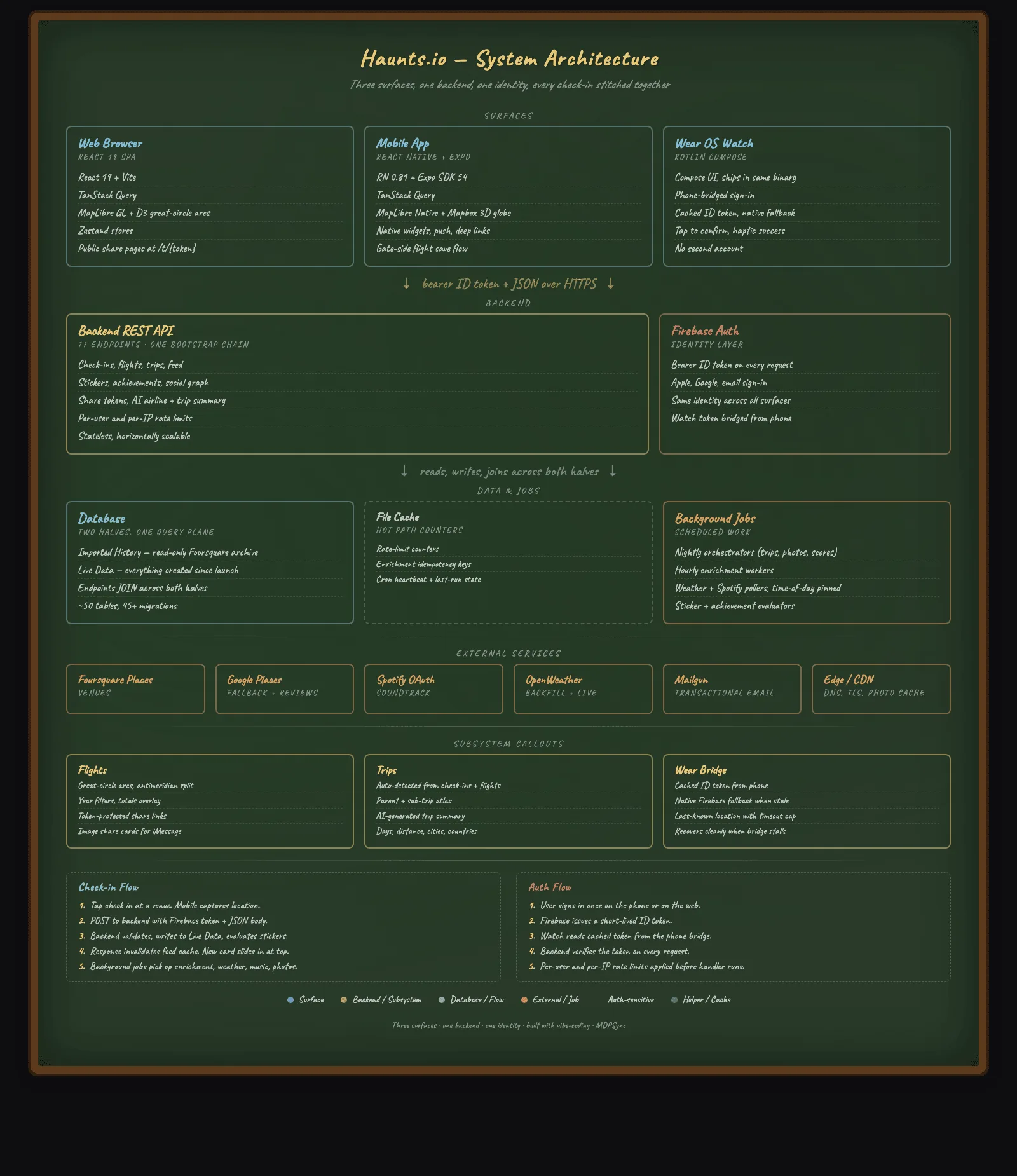
Database With Two Halves
One half is the imported history: the full Foursquare Swarm export of check-ins, venues, photos, and metadata, loaded once from a data export ZIP and never written to again. It is the canonical record of where the user has been, frozen in time.
The other half is the live data for everything created since launch: user annotations (notes, tags, ratings, reviews), social data (follows, comments, likes), gamification state (stickers, achievements, mayors, streaks, points and XP), collections (lists, trips, bucket list), flights and trip share tokens, and user preferences. The split keeps the imported archive pristine while the running product enriches it with new context.
API endpoints frequently JOIN across both halves in a single query, combining the imported check-in history with the live annotations to present one unified view. The check-in feed query, for example, joins the imported check-in row with favorites, sticker log entries, and uploaded photos so each card renders with its full context in one round trip.
API Design
Endpoint Organization
The 120+ API endpoints are organized into functional domains, totaling roughly 27K lines of endpoint PHP:
| Domain | Endpoints | Purpose |
|---|---|---|
| Core | 16 | Check-ins, venues, photos, search, nearby |
| Social | 18 | Feed, follow, profile, comments, likes, activity inbox, friends |
| Gamification | 12 | Achievements, stickers, points/XP, leaderboard, streaks, mayor |
| Trips & Flights | 22 | Trips, flights, road trips, routes, share tokens |
| Collections | 10 | Lists, bucket, countries, revisit, tags |
| Media | 10 | Photos, videos, trip albums, transcode status |
| Enrichment | 12 | Venue details, ratings, AI reviews, notes, weather |
| User | 10 | Settings, export, import, verification, trash, telemetry |
| Admin | 9 | Dashboard, analytics, users, reports, system, audit |
| Integrations | 8 | Spotify OAuth, Swarm sync, push, preferences |
Authentication & Security
Every API request requires a valid Firebase ID token in the
Authorization: Bearer header. The
firebase-auth.php middleware verifies the token
using the Firebase Admin PHP SDK (kreait/firebase-php) and
extracts the user ID that scopes every query, with
visibility rules enforced per check-in, trip, and profile
across the full social graph.
The api-security.php layer adds rate limiting
(per-endpoint configurable), CORS enforcement with explicit
origin whitelisting, content-type validation, and request
size limits. All database queries use parameterized
statements to prevent SQL injection.
Response Patterns
All endpoints return a consistent JSON envelope:
{"success": true, "data": ...} on success, or
{"success": false, "error": "message"} on
failure with appropriate HTTP status codes. Paginated
endpoints include total, page, and
limit metadata. The API supports both
GET query parameters and POST JSON
bodies depending on the operation semantics.
Database Architecture
Schema Design
The imported history half mirrors the
Foursquare data export structure: checkins,
venues, categories, and
photos tables with foreign key relationships.
This schema is populated by an import worker that parses the
Foursquare ZIP export and maps it into normalized tables.
The live data half holds 40+ tables managed through 110 sequential migrations:
| Category | Tables | Purpose |
|---|---|---|
| User Data | users, user_settings, blocked_users | Profiles, preferences, privacy, home location |
| Annotations | favorites, notes, tags, ratings, reviews | Per-venue user content overlaid on Swarm data |
| Gamification | stickers, sticker_log, achievements, achievement_log, mayors, streaks | 54 sticker definitions, 32 achievements, unlock tracking |
| Social | follows, comments, likes, feed_events | Friend graph, engagement, activity broadcasts |
| Collections | lists, list_items, trips, trip_days | Custom venue lists, auto-detected trip grouping |
| Enrichment | venue_cache, weather_cache, checkin_photos | Foursquare Places data, historical weather, photo uploads |
| Push | push_tokens, push_prefs | Device registration, per-category notification preferences |
Migration Strategy
All schema changes are tracked as numbered, idempotent SQL
migration files. Each migration uses
CREATE TABLE IF NOT EXISTS and
INFORMATION_SCHEMA-based conditional
ALTER TABLE statements where possible, since
the underlying engine does not support
ADD COLUMN IF NOT EXISTS. Migrations are
applied through a remote shell command against the
production database.
Gamification System
The gamification engine is the heart of the Swarm replacement experience: 57 stickers, 32 achievements, a mayor system, streaks, leaderboards, and post-check-in engagement nudges.
Sticker System
54 custom stickers span four rarity tiers (Common, Rare, Epic, and Legendary), plus dedicated Flight and Road sets. Each sticker has a set of contextual rules that determine when it is awarded. Rules evaluate venue category (coffee shop, bar, airport, gym), time of day (morning, late night), visit frequency (first visit, 10th visit, 50th visit), and special conditions (checked in during rain, visited 5 countries).
The sticker rule engine runs as both a real-time
post-check-in evaluation and a batch cron job
(jobs/contextual_stickers.php) that
retroactively evaluates all historical check-ins against
newly added rules. This ensures that importing 6,700+ Swarm
check-ins immediately populates the sticker collection
without requiring manual check-ins.
Achievement System
32 achievements with XP values track cumulative progress:
venue count milestones, city/country exploration targets,
streak lengths, photo counts, and category-specific goals
(visit 20 coffee shops, check in at 10 airports). The
achievement evaluator
(jobs/evaluate_achievements.php) runs on a
schedule and compares current stats against threshold
definitions, awarding new achievements and broadcasting
unlock events to the social feed.
Mayor System
The mayor system tracks the user with the most check-ins at each venue. Mayor status is recalculated on each check-in and displayed on venue pages with competitive context ("You need 3 more visits to become mayor"). Mayor crowns appear on profile stats and contribute to the overall gamification score.
Engagement Nudges
After each check-in, the API evaluates near-miss achievements and returns contextual nudges: "You’re 2 check-ins away from Explorer Level 3!" or "First time in this city!" These nudges drive continued engagement without requiring the user to navigate to the achievements page.
Mobile App Architecture
Technology Choices
The mobile app uses React Native 0.81 with Expo SDK 54, targeting both iOS and Android from a single TypeScript codebase. Navigation uses React Navigation v7 with a bottom tab navigator (Feed, Map, Profile) and a native stack for modal screens. State management combines React Context for authentication and TanStack React Query for server state caching.
Key Screens (42 total)
| Category | Screens | Features |
|---|---|---|
| Core Tabs | Feed, Map, Stats, Profile | Infinite scroll, MapLibre clustering, bento grid, collection launchpad |
| Check-In Flow | Nearby, Compose, Confirm | GPS venue search, photo attach, note entry, sticker preview |
| Collections | Stickers, Achievements, Lists, Trips, Bucket, Countries | Progress tracking, rarity filters, trip route maps |
| Travel | Trips, Flights, Road Trips, Trip Detail, Trip Album | Great-circle arcs, snapped road routes, photo and video albums |
| Social | Public Profile Atlas, Followers, Following, Activity Inbox, Check-In Detail | Friend management, atlas profile, unified request and notification inbox |
| Settings | Profile Editor, Notifications, Home Location, Spotify, Blocked, Export | MapLibre location picker, OAuth, push preferences |
Native Integrations
Maps: MapLibre GL Native provides the mapping layer with venue pin clustering, heatmap overlay, and a home location picker in settings.
Push Notifications: Expo Notifications with
Firebase token registration. Deep linking via the
haunts:// URL scheme routes notification taps
to the relevant screen (venue, check-in, profile).
Home Screen Widgets: iOS WidgetKit (SwiftUI) and Android AppWidget provide a quick check-in button that deep-links to the Nearby screen. The widget is static (no live data), just a launch shortcut.
Offline Resilience: A pending check-in queue stores locally created check-ins and flushes them to the API every 15 seconds when the app returns to the foreground. React Query provides stale-while-revalidate caching for all server state.
Background Job System
30+ PHP cron jobs handle enrichment, evaluation, routing, media, AI, and notification tasks that would be too expensive or slow to run inline with API requests.
| Category | Jobs | Purpose |
|---|---|---|
| Gamification | evaluate_achievements, contextual_stickers, seed_achievements, seed_stickers | Batch evaluate unlock conditions, seed initial data, retroactive sticker assignment |
| Enrichment | weather_backfill, venue_enrichment, photo_migration | Historical weather for all check-ins, Foursquare Places data, CDN photo migration |
| Detection & Routing | trip_detector, sub_trip_detector, flight_detector, route_compute | Auto-group check-ins into trips, classify flights and road trips, snap routes to roads |
| Media Pipeline | video_transcode, video_cleanup, photo_rethumb, photo_refetch_originals | Async transcode album videos, regenerate thumbnails, cache full-res originals |
| AI | review_summary_prebuilder, trip_summary_backfill, title_backfill | Generate venue review summaries, trip recaps, and trip titles with Claude |
| Integrations | swarm_sync, spotify_history_poller, mirror_sync, import_export_worker | Ongoing rate-capped Swarm sync, Spotify playback, venue-data mirror, data import/export |
| Push Notifications | push_near_achievement, push_on_this_day, push_streak_save, push_weekly_summary | Engagement nudges, "on this day" memories, streak reminders, weekly recap |
| Maintenance | purge_trash, google_photo_cleanup, usage_rollups | Hard-delete expired trash, orphaned photo cleanup, API usage rollups |
Jobs are scheduled via system cron on the web server. Each job is a standalone PHP script that connects to both databases, processes a batch of records, and logs its results. Jobs are designed to be idempotent and resumable: if interrupted, they pick up where they left off on the next run.
Third-Party Integrations
| Service | Purpose | Integration Method |
|---|---|---|
| Firebase Auth | Identity and authentication (Google + Apple Sign-In) | kreait/firebase-php SDK, ID token verification on every API request |
| Foursquare Places API | Venue search, details, ratings, hours, photos | REST API with server-side caching in venue_cache table |
| Google Places API | Nearby venue lookup for mobile check-in | REST API with radius-based search from device GPS |
| Spotify API | Capture currently playing song at check-in time | OAuth 2.0 flow with refresh token, background polling cron |
| Weather API | Historical weather for every check-in | Batch backfill cron job with per-checkin lat/lng lookup |
| Mailgun | Email verification for new accounts | Transactional email via SMTP |
| Expo Push | Cross-platform push notifications | Device token registration, server-side push via Expo API |
Performance & Infrastructure
Server Architecture
The production stack runs on a dedicated application server behind an edge layer that handles DNS, TLS termination, and DDoS protection. A persistent application server with bytecode caching keeps response times tight, and the cache is reloaded after each deployment so new code takes effect immediately.
Database Layer
The database runs on a dedicated host, separating storage I/O from application processing. Redundant storage with automatic snapshots protects against data loss. Connection pooling and query optimization (indexed JOINs, selective column fetches, pagination limits) keep response times under 200ms for most endpoints.
CDN & Caching
The edge layer handles DNS, TLS termination, DDoS
protection, and static asset caching with 1-year
Cache-Control headers and a
?v=N query string for cache-busting. A separate
image CDN serves user-uploaded photos with on-the-fly
resizing (original, cap300, cap600, 500x500 variants).
Static web assets (JS, CSS, fonts) are served with gzip
compression.
Performance Optimization
A dedicated performance pass on Day 3 addressed 21 identified bottlenecks: batched database queries replacing N+1 patterns, React.memo and useMemo for expensive component renders, lazy loading for below-the-fold images, query result memoization in the API layer, and connection reuse across background job batches.
Day-by-Day Build Timeline
| Day | Date | Focus | Key Deliverables |
|---|---|---|---|
| 1 | April 10 | Full Stack Launch | Backend API (Phases D-J), React web app, history feed, venue pages, heatmap, stats, gamification, lists, trips, Spotify, weather backfill, SEO, legal pages |
| 2 | April 11 | Mobile + Polish | React Native app (Phases L-N): check-in flow, MapScreen, stats, heatmap overlay, push notifications, landing page redesign, 3-year review |
| 3 | April 12 | Social + Performance | Comments, coincidence engine, weekly leaderboard, sticker system overhaul (rarity tiers), enriched venue details, performance pass (21 fixes) |
| 4 | April 13 | Data + Widgets | Foursquare Places API migration, Swarm data import/export, contextual sticker auto-assignment, add-to-list flows, iOS WidgetKit + Android widgets, social profiles |
| 5 | April 14 | Enrichment + Polish | Venue notes/tags, achievement nudges, first-time celebrations, mayor badges, countries page, revisit list, leaderboard tabs, feed broadcasts, coincidence detector, trip photos |
The web app and complete backend API launched on Day 1. The mobile app shipped on Day 2. Days 3-5 added social features, refined the gamification system, migrated third-party APIs, and polished the user experience. Every phase followed the same pattern: architect makes design decisions, AI executes implementation, architect reviews and deploys. The two months after the sprint kept that same pattern running. The systems below were built and hardened on it.
Post-Sprint Systems
The sprint produced a working platform, and the systems underneath it were built in the weeks after. Each one below was added and hardened after launch, alongside the Pulse social feed and a public profile atlas that mirrors the web client on mobile.
Road Trips
A road trip is declared like a live trip, then classified by kind. Endpoints store the route geometry, snap it to real roads through a directions provider, and compute distance and the states or provinces crossed from ISO 3166-2 codes. Shared road trips union every member’s route into one canonical record, draw a colored line per driver, and rank everyone on a road-distance leaderboard.
Photo & Video Albums
Trip albums accept photos and videos. Small videos upload directly. Large ones use a resumable session protocol that splits the file into chunks, hashes each chunk, and finalizes server-side. A transcode worker flips uploads from pending to ready, and a retention worker prunes the originals on a schedule. Album media hydrates onto the public trip share page once it is ready.
Live Swarm Sync
Beyond the one-time import, an ongoing connection keeps pulling new Swarm check-ins on a rate-capped schedule. A worker processes due connections under a global ceiling, dedupes against existing rows, soft-deletes superseded records on match, and surfaces a reconnect action when a connection stalls.
AI Layer
Claude Sonnet writes the trip recaps. Claude Haiku handles the lighter, higher-volume work of trip titles, year-in-review blurbs, and venue review summaries. Generation runs in background workers with usage logging, so the write-ups are prebuilt and cached rather than generated on the request path.
Trash & Soft Delete
Trips, check-ins, album media, comments, and flights all
soft-delete with a deleted_at timestamp and a
30-day recovery window. A purge worker hard-deletes past the
window. Soft-deleted rows are excluded from every read path,
background detector, and aggregate, so a deleted record
never resurfaces in a feed or a count.
Venue Data & Discovery
Nearby discovery serves known venues straight from the Haunts database when enough are in range, falling back to external providers otherwise, with provider attributions stacked per venue. A nightly mirror enriches under-served regions from an alternate places dataset, and member-editable coordinates carry an audit trail under an own-data-first precedence rule.
Tell Us What You Want Built
You have just read the architecture behind five surfaces and 120+ endpoints built by one architect. Tell us what you need built and we will tell you what it takes.