
A multi-state operator got back full control of a Dynamics 365 platform it had paid for but could not open for six years. In one week MDPSync recovered the locked solution as readable source and cataloged 236 custom tables and 900+ automations across three connected systems, so changes no longer depend on consultants building workarounds beside it.
A Platform They Paid For but Could Not Open
The client operates the same line of business in three states, each state on its own Microsoft Dynamics 365 system with its own Business Central accounting and its own ArcGIS mapping integration. The three systems hold the inventory, the contracts, the work orders, the billing, and the state reporting. If one of them failed in a way nobody could fix, the business in that state would stop with it.
A decade of rotating vendors and consultants built these systems, and each left a layer behind. One state program arrived as what Microsoft calls a managed solution, a locked package that runs fine but cannot be opened, read, or safely changed without the original source files. The vendor never handed those files over, and then the vendor was gone. For six years every change inside that package meant hiring expensive consultants to build workarounds beside it.
What survived on the client’s own equipment was a scattering of old project folders, several partial copies of what might be source code, with no record of which copy matched what production was running. There was no catalog of what the three systems contained and no way to rebuild any of them, and nothing anywhere said what all that money had bought.
An AI That Reads the Live System Directly
The traditional approach to a recovery like this is a team of consultants clicking through admin screens for months, writing down what they see. MDPSync connected an AI directly to the systems instead, so it could read every table, workflow, and line of configuration straight from the source and hold all three systems in view at once.
Every claim the AI made was checked against the live environment or the recovered files before it was written down. None of the tools below required installing anything into the client’s environments, and the entire audit was read-only by design.
Dataverse MCP
A live connection that lets the AI query the Dynamics 365 database directly, reading tables, fields, and records the way an administrator would.
Power Platform CLI
Microsoft’s own command-line tools, used to export solutions from each environment and unpack them into readable files a person can review and version.
Browser-Based Extraction
Where no API exists, a Chrome extension let the AI work through the same admin portals a human would use, pulling flow definitions and accounting configuration page by page.
Decompilation
Compiled code components that had no source anywhere were pulled out of the live systems and turned back into readable code, then test-compiled to prove the result builds and runs.
Version-Controlled Repositories
Everything recovered or extracted landed in Git repositories the client owns, one per state program, so every future change can be reviewed, compared, and rolled back.
Independent Second Passes
Each system was audited twice, the second pass run fresh on the assumption that a single reading finds only what the reader goes looking for.
One Architect and One AI Across Three Systems
What One State Program Looks Like
Dynamics 365 is the hub of each state’s stack, holding a custom data model of dozens of tables and over a hundred automated flows, while Business Central runs the orders, invoicing, and payments, and ArcGIS keeps the map in sync through a message queue.
Multiply this by three states, add a decade of vendors each building their own way, and note the warning box in the corner: credentials and connections shared across all three programs, so a problem in one state would reach every state. Producing this map, which the client never had, was the first deliverable of the audit.
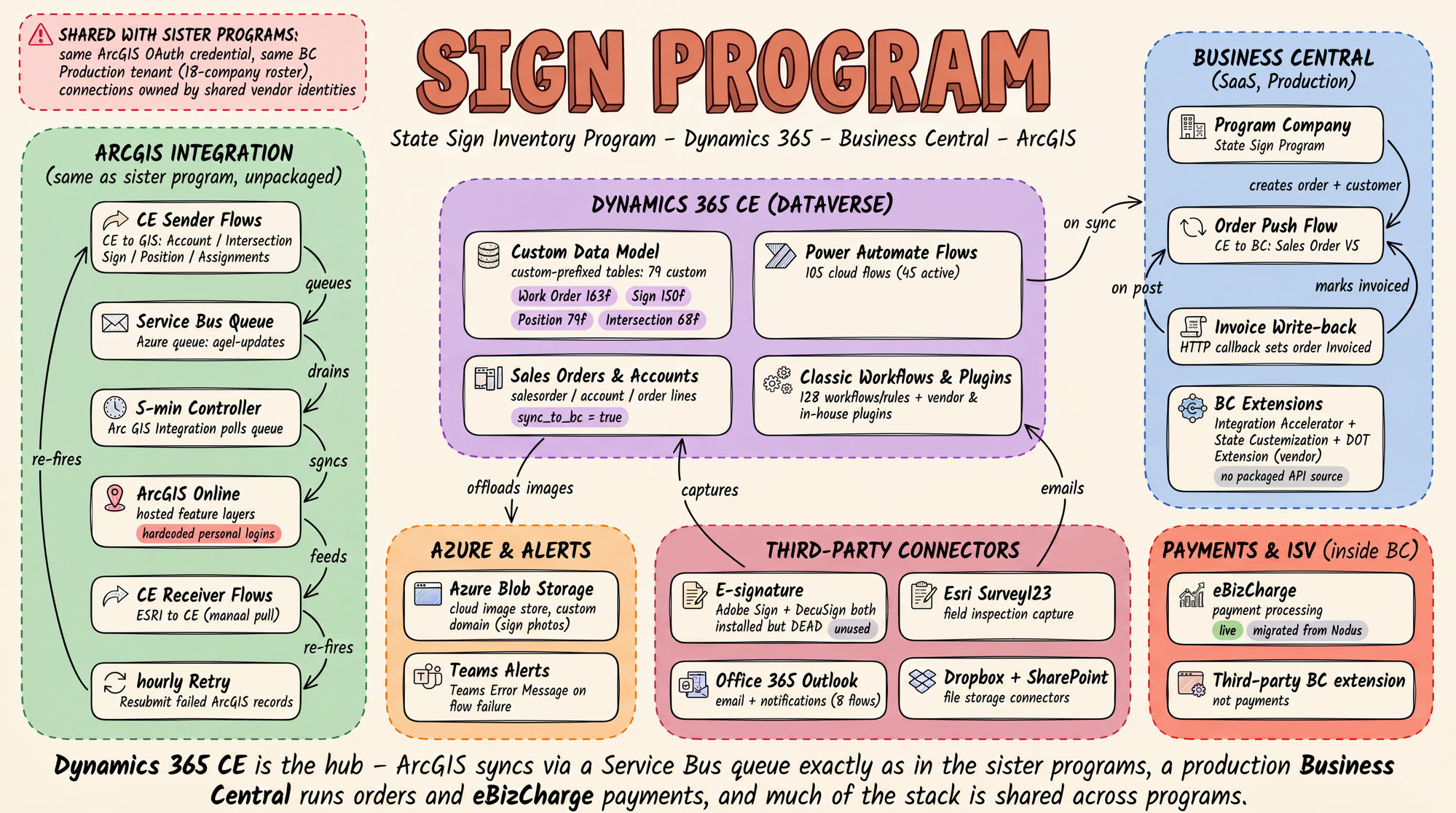 One program’s full architecture, mapped during the
audit. Click to enlarge.
One program’s full architecture, mapped during the
audit. Click to enlarge.
Recovery from Two Directions at Once
The first direction was recovery: tracking down the vendor’s original source files in old project copies that survived on the client’s own equipment, covering the custom code, the report designs, and the accounting extensions. The second was capture: pulling the current definition of everything straight out of the three live systems and comparing the two, item by item, to establish what still matches, what has drifted, and what was never in the vendor’s files at all.
Across the three systems the audit cataloged 236 custom tables, more than 700 classic workflows and business rules, over 260 modern automated flows, every custom web page and script, report, security role, and compiled code component. Some pieces existed nowhere in the vendor’s files and had to be pulled from the live systems, including a 65-page order-submission script and screens still being updated the month before.
Then each system was audited a second time, independently, without reference to the first pass. On two of the three systems the second pass produced the single largest finding of the whole engagement, and reading the three tenants side by side surfaced problems no single-system audit could have seen, because the evidence was in the differences between them.
Six Years of Accumulated Risk, Made Visible
The systems were healthy and no data had been lost, yet problems had been running for years without detection, because the systems could not be read well enough to find them.
Everything Ran Twice
One program carried 27 pairs of identical automation routines, both copies switched on, running the same logic twice on every transaction since 2022, and another had a background routine registered twice since 2020, without anyone noticing either.
One Credential, Three States
The credential connecting the systems to the mapping platform was a single shared value used by all three programs, stored as plain readable text, which means a leak in any one state would expose the other two.
The Vendor Still Held the Keys
The connection carrying orders into billing signed in under accounts created by the departed consulting firm. If one of those accounts were disabled during routine cleanup, order billing would stop. Three outside firms still held administrator access nobody had reviewed.
Each finding was written up with evidence, risk, and a rollback plan. The zero-risk fixes were applied in production the same day they were confirmed and verified afterward. Everything else went into a ranked, written follow-up list waiting on the client’s go-ahead, so nothing changed without a decision.
In Full Control for the First Time
Every asset across all three systems now exists as readable, editable source in repositories the client controls, verified against production. The recovered code was test-compiled to prove it builds and runs. The program that arrived locked can be rebuilt from the client’s own files for the first time since the day it was delivered.
Standing up a clean development environment from owned source, merging the three tenants’ overlapping pieces deliberately, replacing the locked managed solution with an unlocked one, and working from a modernization roadmap already scoped and sequenced all begin with the catalog the audit produced. Work that would have taken a traditional consulting team months of rediscovery now starts from a repository instead of an interview.
Assets Protected
If the worst happened to production, everything needed to stand the platform back up is in hand.
Faster Development
Changes can be planned against the real system, reviewed before they ship, and rolled back if they go wrong.
Lower Costs
No more paying consultants to rediscover the system before every change. The knowledge is written down and stays current.
Streamlined DevOps
Versioned source, repeatable builds, and a catalog that can be refreshed on a schedule.
The locked system, rebuilt and verified in the open
The sealed system was reconstructed piece by piece in a fresh environment: every table, screen, business rule and automation, the security model, the main application, and hundreds of thousands of records of program history. The rebuild was then validated by exporting the reconstructed package and importing it cold into a completely empty environment, where it matched the original field for field.
The rebuilt environment is deliberately disconnected from the mapping service, the accounting system, and customer email, so nothing done there can touch production. Behind it sits what the client never had before: complete blueprints in version control, and a written playbook of every obstacle the rebuild hit and how each was solved, so the entire process is repeatable from scratch.
About a Week Against Six to Twelve Months
A traditional recovery engagement for three enterprise tenants means a team of specialists on site for months, interviewing whoever remembers the most and clicking through admin screens one at a time. The rediscovery phase alone routinely runs six months or more before anyone touches a fix.
MDPSync delivered the complete audit, the recovery, and the ranked modernization roadmap in about a week, because the AI reads the systems directly, with no interviews to schedule. The client’s multi-million dollar platform investment is secured, and the modernization roadmap that follows is measured in weeks.
Take Back Control of Your Platform
If a vendor built your Dynamics, Business Central, or GIS systems and you no longer control the source, you are one departure away from the situation this client was in. Tell us what you are running and we will tell you what it takes to own it again.